Each part of Sitbuster starts from a moment you'll probably recognise from your own desk days. Then what Sitbuster does about it, the real screens you'll see, and what changes for you.
Take it slowly, or jump to the part you're curious about. Where a screen makes a health claim, its evidence label and sources are right beside it.
01
Your day
Today and small wins
Free
It's two in the afternoon. You've been in your chair since the morning stand-up, and you couldn't say how long that's been.
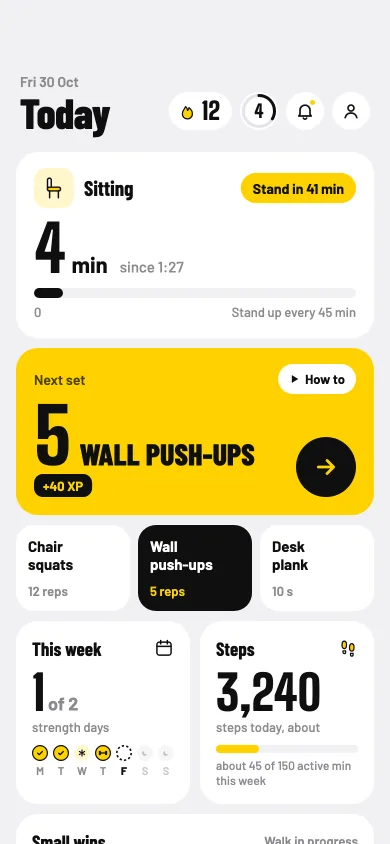
Today is your home screen, and it starts with exactly that: how long you've been sitting, in big numbers, starting again every time you move. Under it sits your next set, one tap from the camera, with a how-to beside it. Then this week, your steps and today's small wins.
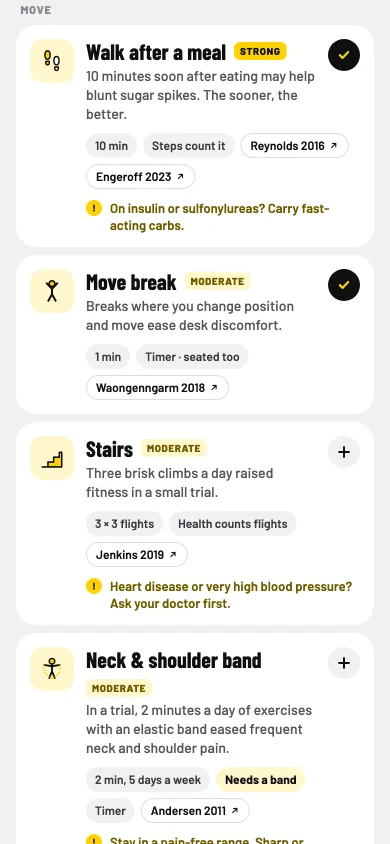
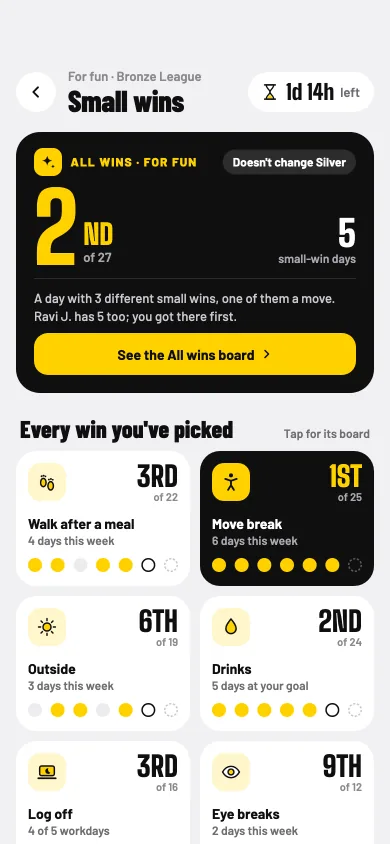
Small wins are the tiny things that fit a desk day: a walk after a meal, a move break, a few minutes outside, a drink. Pick the ones that suit you from a library of 14. Each shows how strong the evidence behind it is, with its sources, so you know what you're choosing.
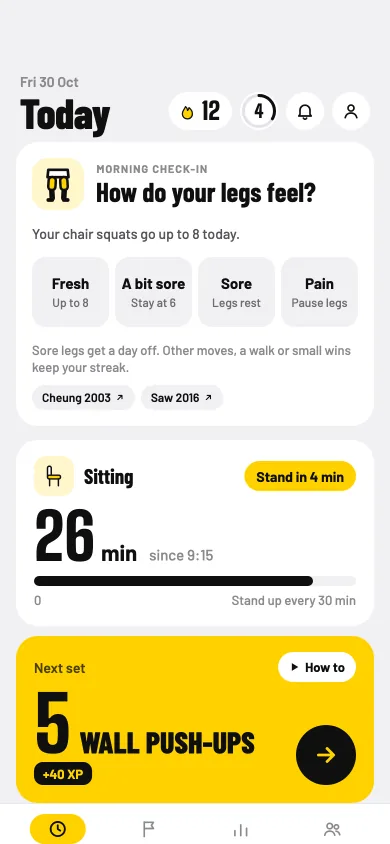
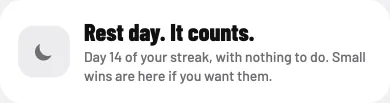
Each morning, a quick check-in asks how your muscles feel, and the plan listens. On a planned rest day, Today says "Rest day. It counts." and asks nothing more of you.
How long you've sat. It starts again every time you move, with your next set right under it.
A morning check-in. How your legs feel shapes today's sets.
Pick your small wins. Each with its evidence label, from Strong to Weak, and its sources.
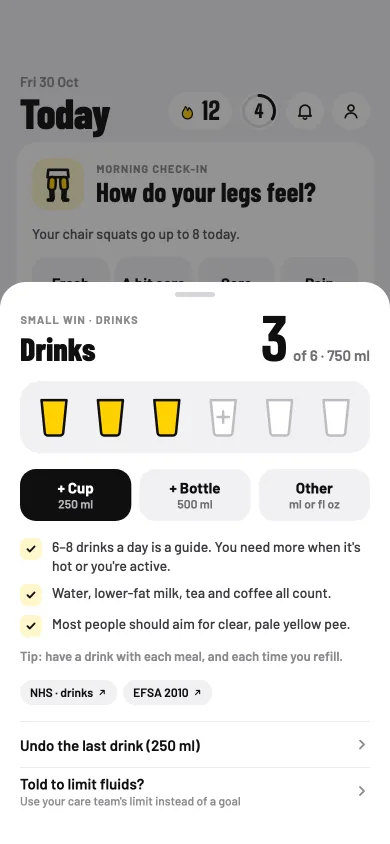
A drink, in one tap. In your own cups and bottles, in ml or fl oz.
What changes for you
You see your sitting, and it resets the moment you move.
Your next set is always one tap away.
A busy day can still count, with a few small wins that include a move.
Your level, and where your XP comes from: sets at your target, your walks, trail stops and bosses.
A rest day, on Today. "Rest day. It counts." Nothing to do.
The small-wins library, as the app shows it
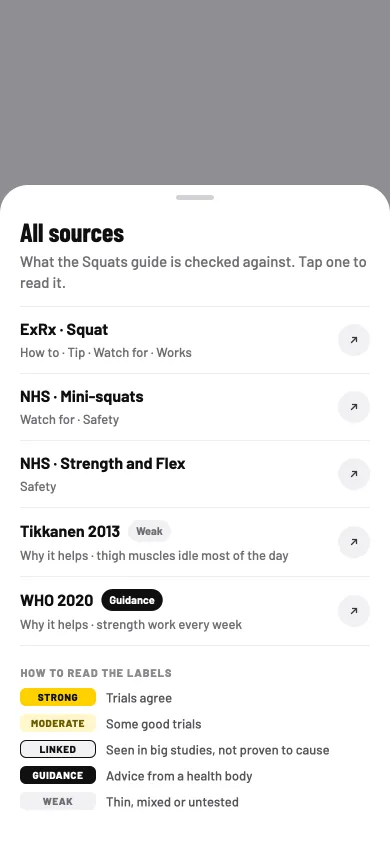
StrongTrials agree
ModerateSome good trials
LinkedSeen in big studies, not proven to cause
GuidanceAdvice from a health body
WeakThin, mixed or untested
Walk after a meal Strong
10 minutes soon after eating may help blunt sugar spikes. The sooner, the better.
On insulin or sulfonylureas? Carry fast-acting carbs.
Small wins are for feeling better, not treatment. If you have a health condition, follow your care team.
Camera-counted sets
Free
You'd happily do a few squats between calls. But counting reps while watching the clock, and wondering whether that one was low enough, takes the fun out of it.
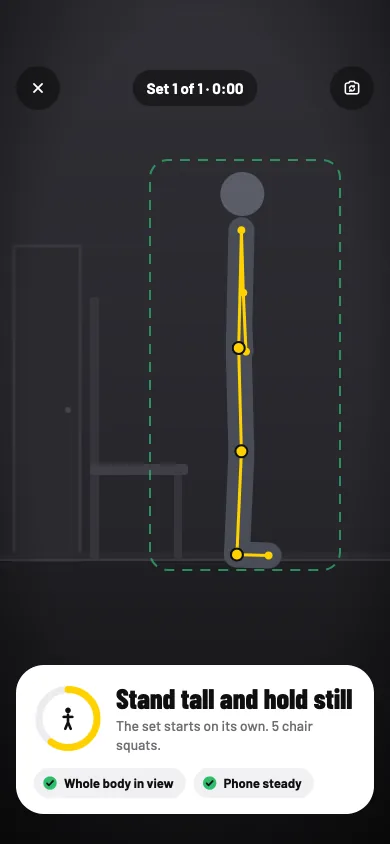
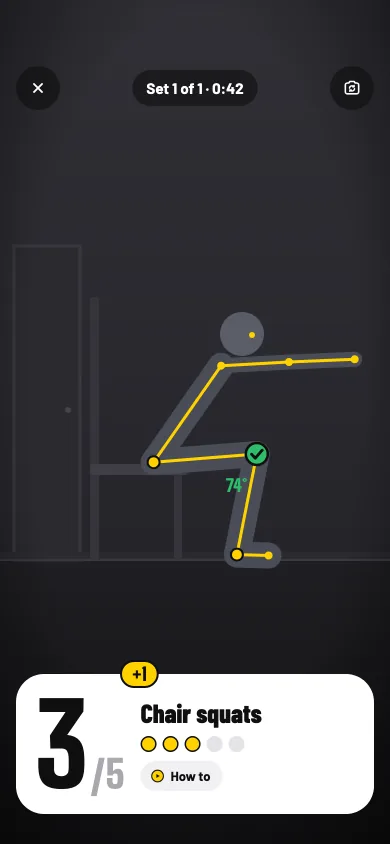
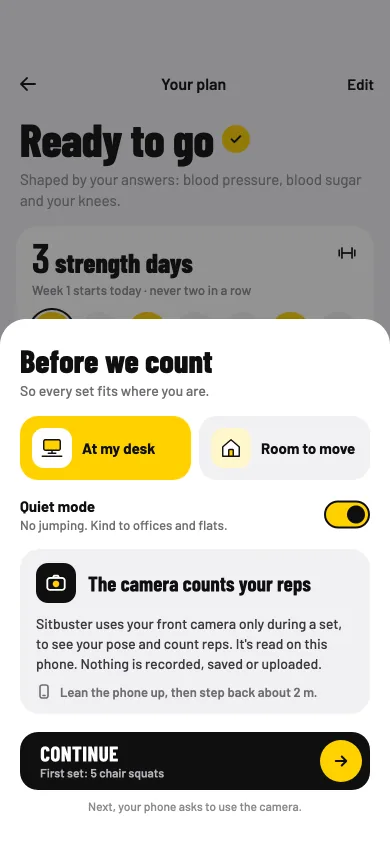
Lean your phone against a mug or a wall, step back, and do a short set. The camera reads your pose on the phone and counts each rep, or times your hold. Each frame is read and dropped: nothing is recorded, saved or sent.
The moves are made for a desk day: chair squats, wall push-ups, desk planks, wall sits and hip hinges, then their harder versions. You need a chair, a wall and a little floor. Hold still to start, and the set begins once you're in view. When you reach your target, it says so: "Stop here. That's today's win."
Get set. Stand tall and hold still. The set starts on its own.
Every rep, counted. A count card you can read from across the room.
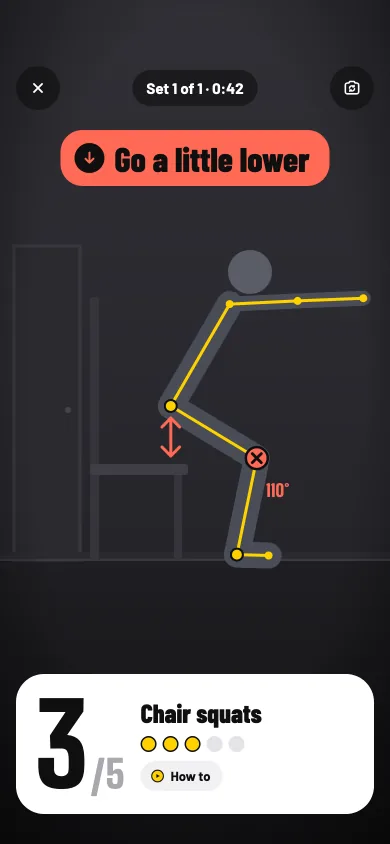
A rep that doesn't count. A cue says why: "Go a little lower".
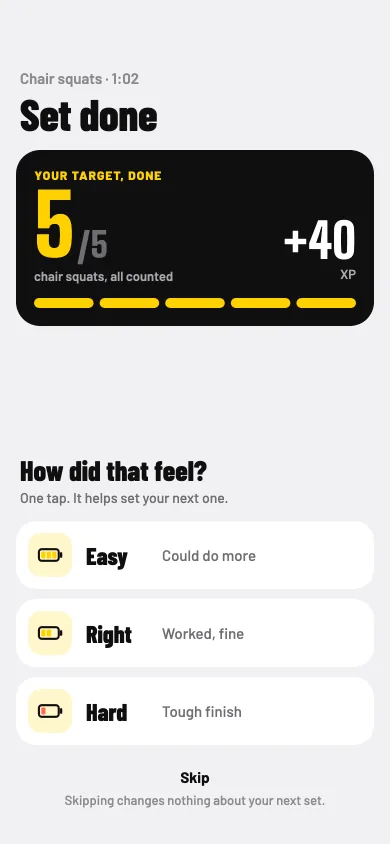
How did that feel? One tap, Easy, Right or Hard, helps set your next one.
What changes for you
You move without counting, and you know when to stop.
Camera off? Count by tapping, with a timer for holds. A tapped set is a small win toward your streak.
Quiet mode for offices and flats: no jumping.
Level ups as you go, with a streak freeze for each new level.
Move guides and their videos
Free
It's a move you haven't done before. You'd like to see it once, and know what to watch for, before you try it in front of a camera.
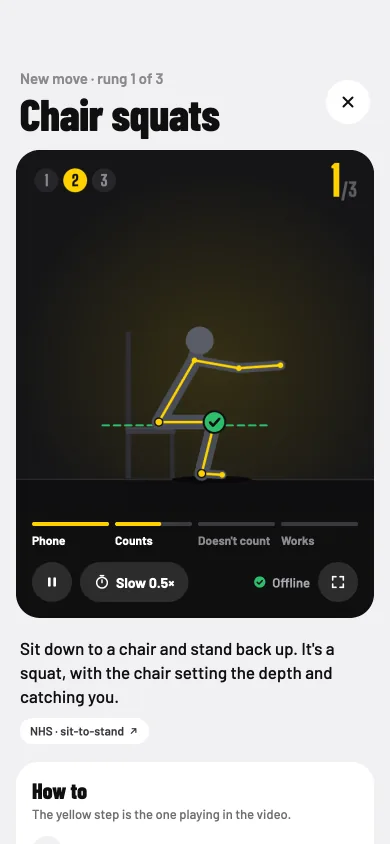
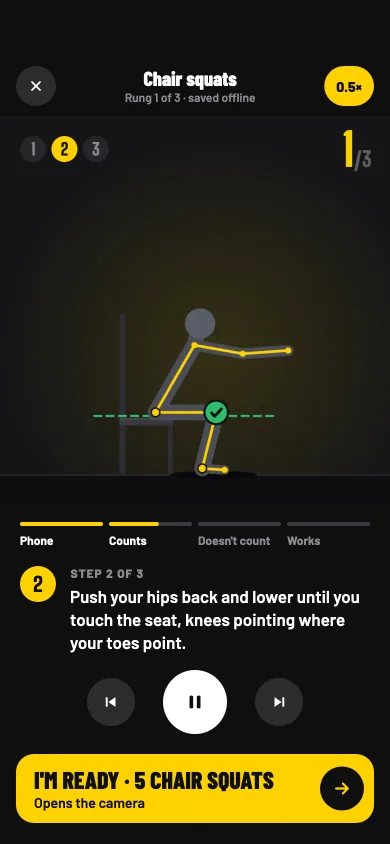
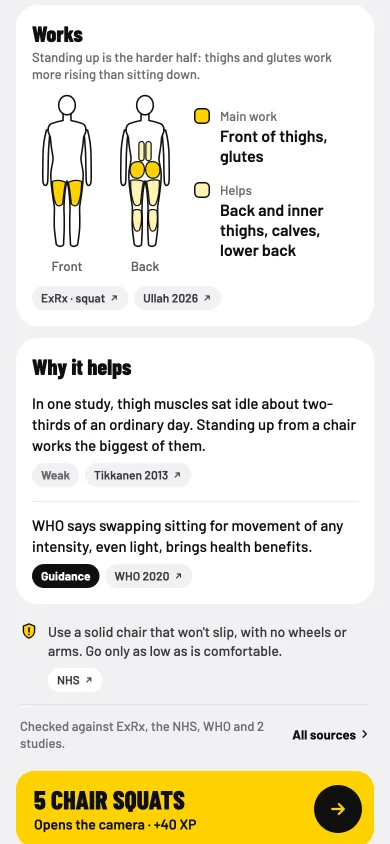
Every move has a guide, laid out the same way each time. First a short wordless video, then three steps, with the yellow step matching the one playing. Then how it's counted, what to watch for that the camera can't check, the muscles it works on a body map, why it helps, and how to stay safe.
A guide opens before you try a new move, and any time from "How to". Each video downloads the first time you open it and stays on your phone, so it plays offline. Every claim carries its evidence label, and every source sits in one list.
The guide. The video first, then what the move is for.
Three steps, in time with the video. Full speed or slowed down.
Works, and why it helps. A body map, and each claim with how strong its evidence is.
All sources. Tap any of them to read it yourself.
What changes for you
You know what a move should look like before you start.
Safety notes for each move, and the mistakes worth watching for.
Move guides stay free.
WHO advises muscle-strengthening on 2 or more days a week, working all major muscle groups.
Three meetings back to back. When the last one ends, your neck and shoulders feel every minute of them.
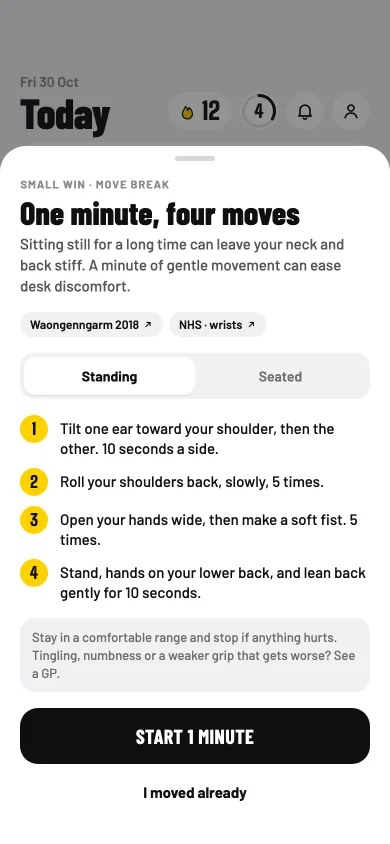
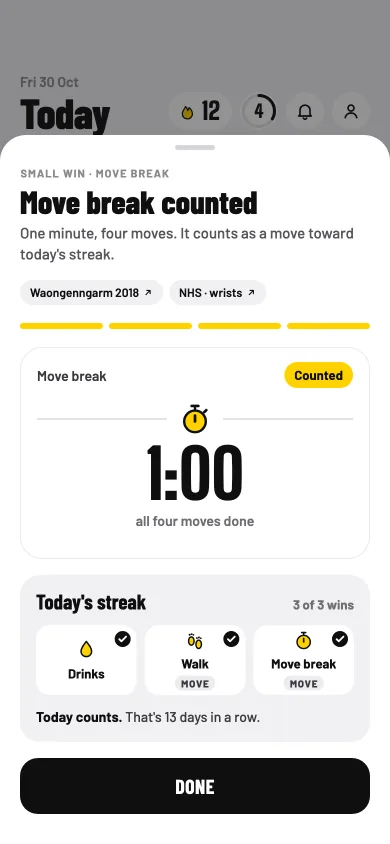
A move break is one minute and four gentle moves, for when you've sat a while. Pick Standing or Seated. Each step has its own looping clip beside the timer, so you can follow along without reading, and the break counts as a move toward today's streak.
If something hurts, say so: the moves that use that area pause, and the rest still count. Been up and about already? Tap "I moved already".
One minute, four moves. Standing or seated, laid out before you start.
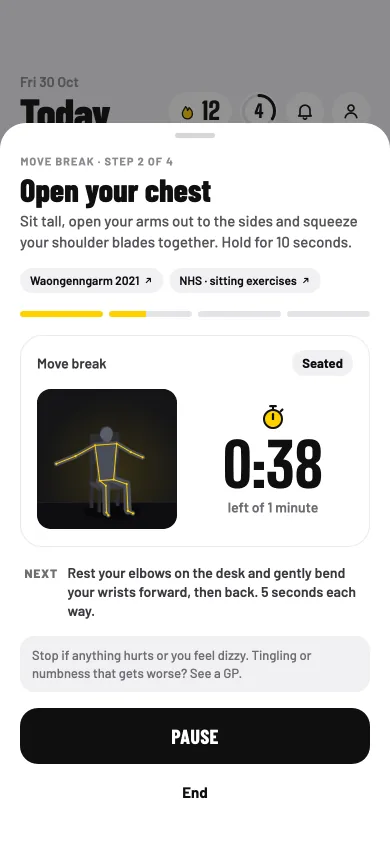
A clip for every step. Beside a timer, so you can just follow along.
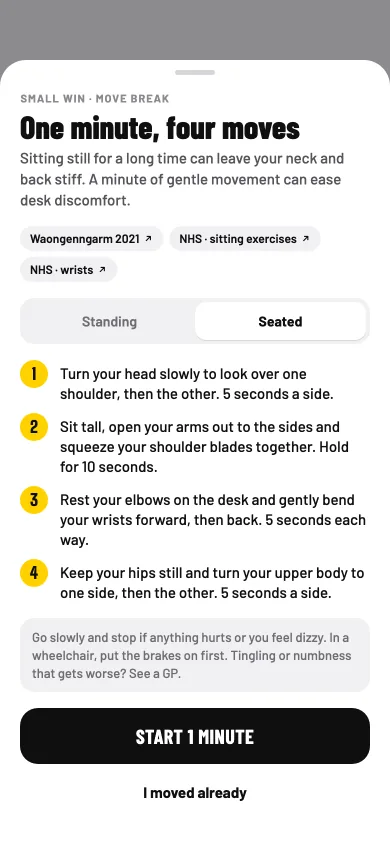
Seated, from your chair. Head, chest, wrists and a gentle twist.
Counted. A move break is a move toward today's streak.
Standing
Tilt one ear toward your shoulder, then the other.
Roll your shoulders back, slowly.
Open your hands wide, then make a soft fist.
Stand, hands on your lower back, and lean back gently.
Seated
Turn your head slowly to look over one shoulder, then the other.
Sit tall, open your arms out to the sides and squeeze your shoulder blades together.
Rest your elbows on the desk and gently bend your wrists forward, then back.
Keep your hips still and turn your upper body to one side, then the other.
Breaks where you change position and move ease desk discomfort.
Stay in a comfortable range and stop if anything hurts. Tingling, numbness or a weaker grip that gets worse? See a GP.
Roll your shoulders (standing)Open your chest (seated)
The clips are the app's own, with no sound. They load only when you press play.
Walk after a meal, and steps
Free
Lunch at your desk again, then straight back to the screen. You keep meaning to take a short walk afterwards, and the afternoon keeps getting in the way.
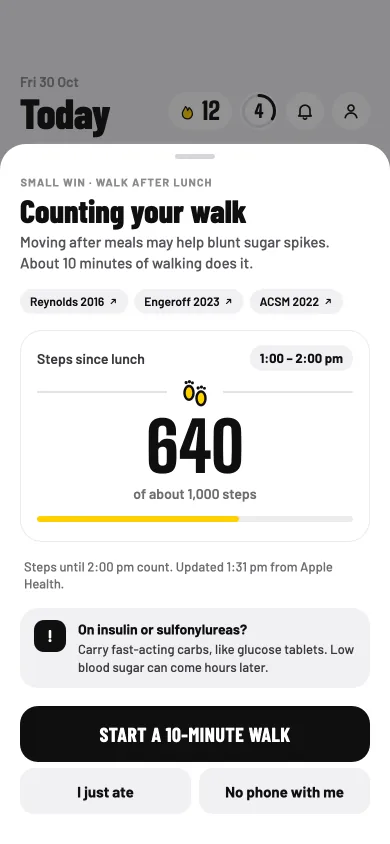
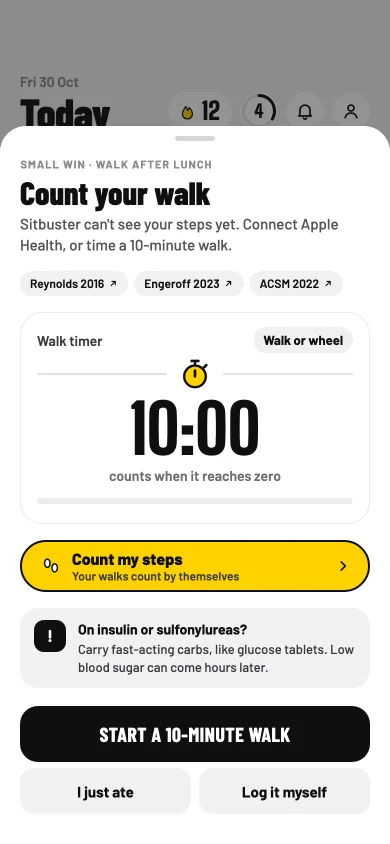
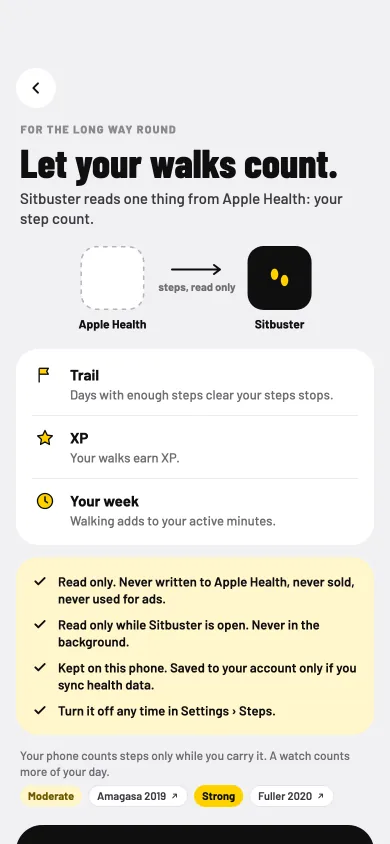
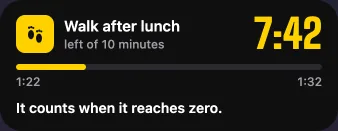
Tell Sitbuster when you usually eat. After lunch and dinner, a nudge suggests a short walk. With steps on, your phone's steps count it. Without them, a timer marked "Walk or wheel" does, and it keeps going when you lock your phone.
Ate at another time? Tap "I just ate". Left your phone at your desk? Log the walk yourself. Steps come from Apple Health on iPhone or Health Connect on Android, read only. On Android 13 and older, your phone can count its own steps, with no other app or account needed.
Your steps count it. The walk fills up as you go, with its caution right there.
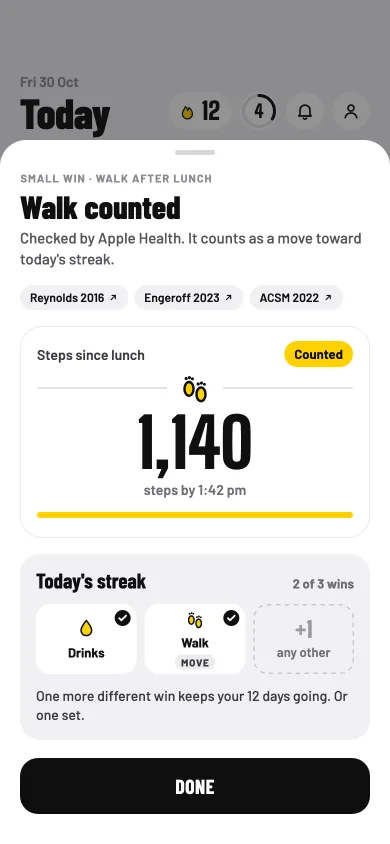
Counted. Checked by your steps, and a small win toward today.
No steps? A timer. Marked "Walk or wheel".
One thing read. Your step count, and four promises about it.
What changes for you
A nudge after lunch and dinner, so the walk isn't left to memory.
Your walks earn XP, clear steps stops on the trail, and add to your active minutes.
Read only: never written to Apple Health or Health Connect, never sold, never used for ads.
Kept on your phone, and saved to your account only if you sync health data. Turn steps off any time, and remove your step history with one button.
10 minutes soon after eating may help blunt sugar spikes. The sooner, the better.
On insulin or sulfonylureas? Carry fast-acting carbs, like glucose tablets. Low blood sugar can come hours later.
On the lock screen, on iPhone. The walk timer as a Live Activity.
02
Around your work
Nudges, notifications and quiet hours
Free
You sat down after lunch, answered a few emails, joined a call. The next time you look up, it's nearly four.
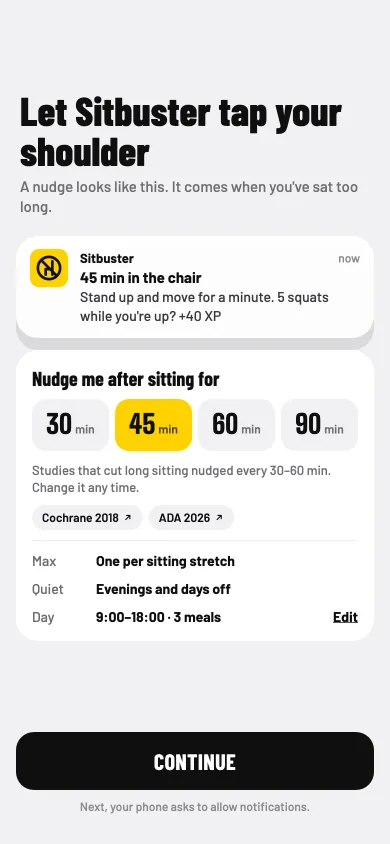
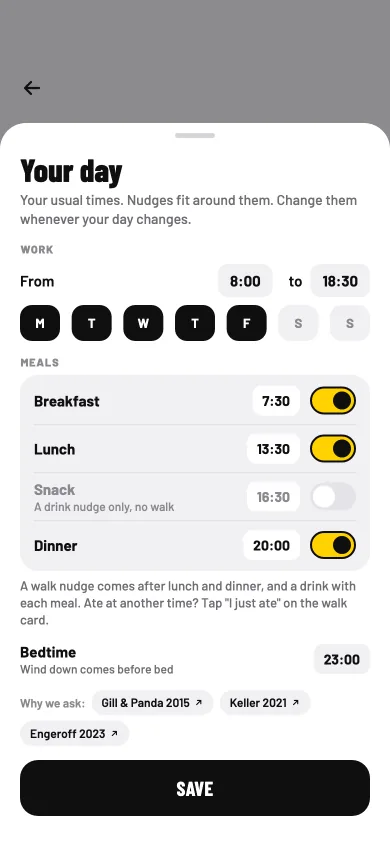
A nudge is a tap on the shoulder when you've sat too long: stand up and move for a minute. You choose how long you sit before one comes. Nudges fit around your work hours, your meals and your bedtime, and small wins come along with a stand-up rather than as extra buzzes.
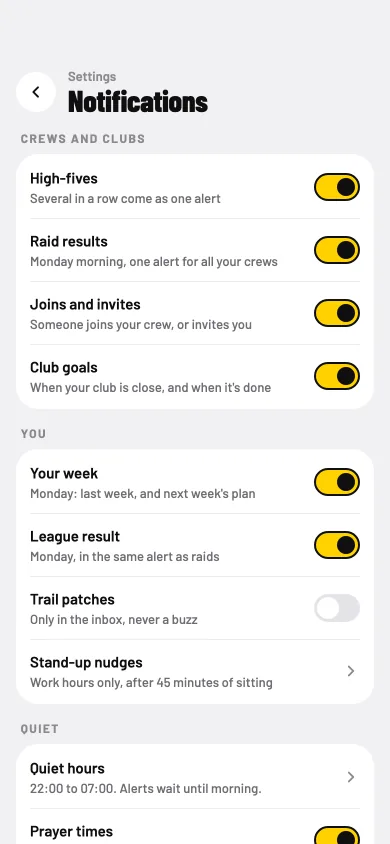
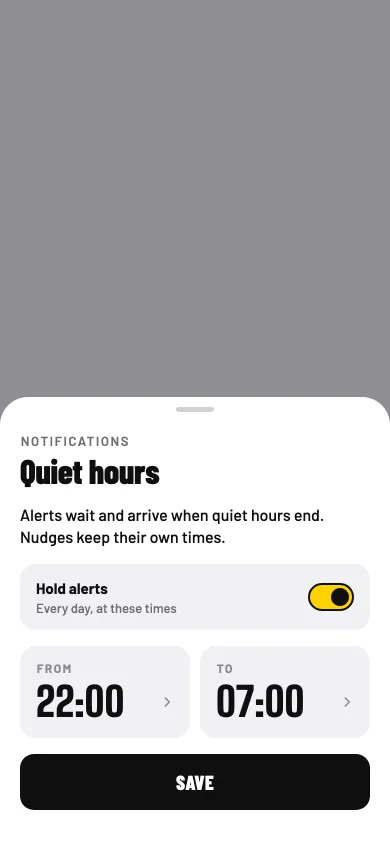
Notifications are yours to shape: high-fives and crew news, your week and your league result, or nothing at all for a while. Quiet hours hold alerts until they end, and Log off and Wind down nudges close the workday and the evening.
How long you sit. You pick 30, 45, 60 or 90 minutes.
Your day, in one place. Work hours, meal times and bedtime. Change them when your day changes.
Notifications, your way. A switch for each kind.
Quiet hours. Alerts wait, and arrive when quiet hours end.
What changes for you
A tap on the shoulder while there's still afternoon left.
Quiet at prayer times, if you want it, all year.
Pause everything for today.
Trail patches go to your inbox only, never a buzz.
On Android, a sheet that helps your phone deliver nudges on time.
Your own nudges, too. Reminders in your own words, like "Call Mom" on Sunday evening, come with Plus. See how
Your own nudges
Plus
You meant to call Mom on Sunday. Then it was Wednesday, and another week had gone by.
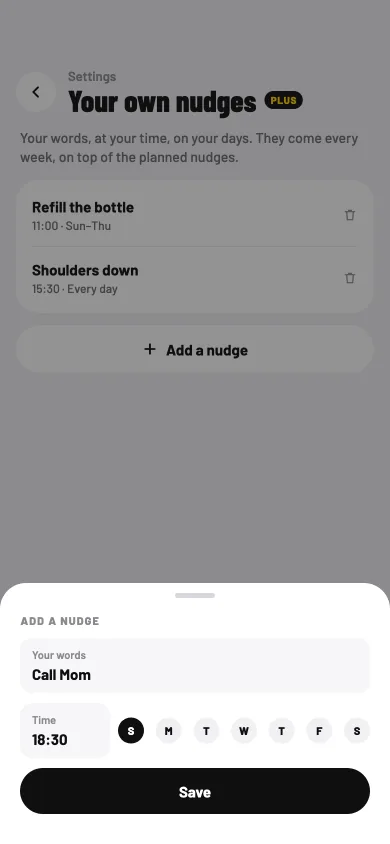
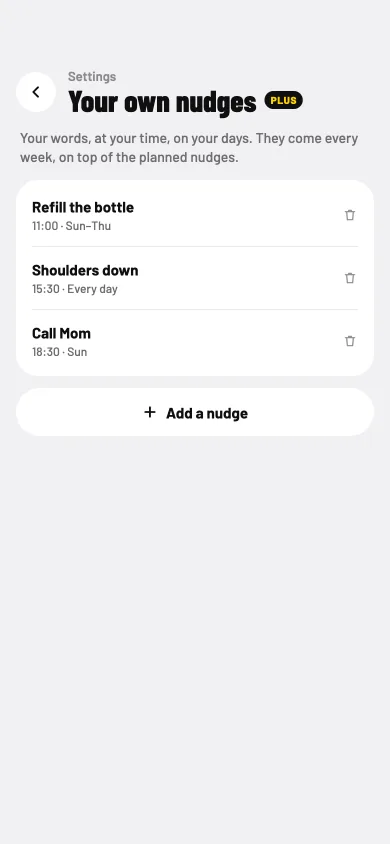
Never miss a call or a message to someone you love. Your own nudges are reminders in your words, at your time, on your days. Write "Call Mom", pick Sunday at 18:30, and every Sunday evening your phone reminds you, on top of Sitbuster's planned nudges.
A small cue at the same time helps it become a habit. Use your own nudges for anyone you'd like to keep in touch with, or for anything that helps your day, like "Refill the bottle". Your own nudges are part of Plus. If Plus ends, they stop, but they stay saved.
Your words, your time. "Call Mom", Sunday, 18:30. Pick any days, and any time.
Every week, until you remove it. In Settings, under Notifications.
Tying a new habit to a set time, or to a daily routine, helped it form equally well. Repeating it was what mattered most.
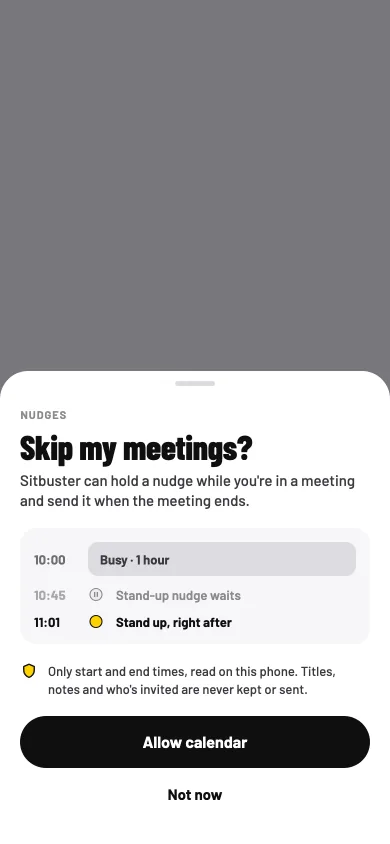
Your stand-up nudge arrives two minutes into a client call. You swipe it away, and that's the last you think of it all afternoon.
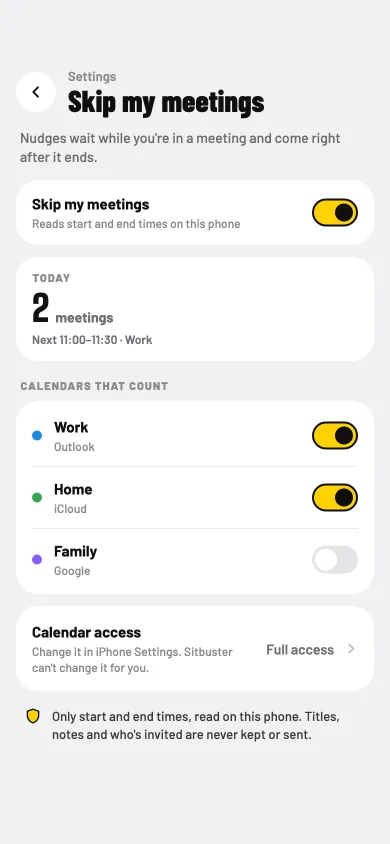
Skip my meetings lets Sitbuster hold a nudge while you're in a meeting and send it right after. You pick which calendars count. Only start and end times are read, on your phone. Titles, notes and who's invited are never kept or sent.
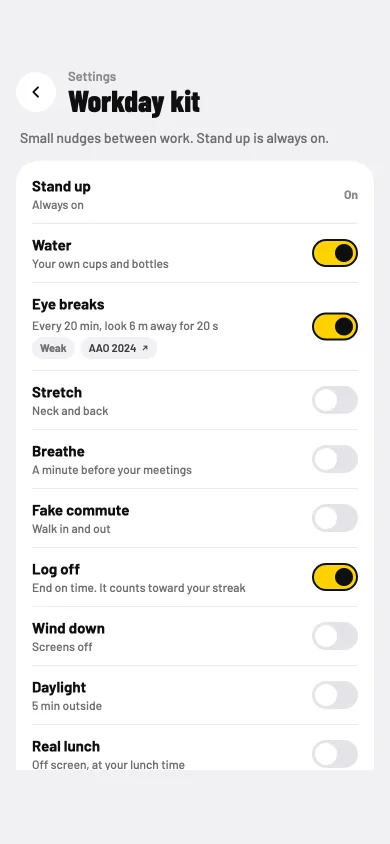
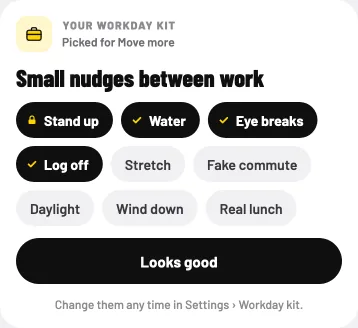
The workday kit is a set of small nudges between work. Stand up is always on. Turn on the rest to fit your day: water, eye breaks, stretch, breathe, a fake commute, log off, wind down, daylight and a real lunch. On day one the kit is picked for your goal, and you can change it any time.
The ask. A stand-up waits through the meeting, and comes right after.
You pick the calendars. Only start and end times are read.
Your workday kit. Turn on the ones that fit your day.
What changes for you
No stand-up nudge in the middle of a call.
Water in your own cups and bottles, in ml or fl oz.
Log off on time, and it counts toward your streak.
Day one. Your kit, picked for your goal.
Widgets, the Live Activity and the chair clock
Free
You'd rather not open an app to see where your day stands. A glance at the phone already in your hand should be enough.
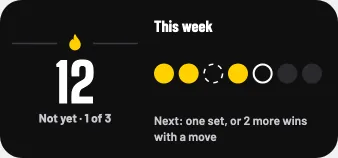
Black home-screen widgets with a yellow accent show your streak, your steps and this week at a glance. Lock-screen widgets show only the count and today's state.
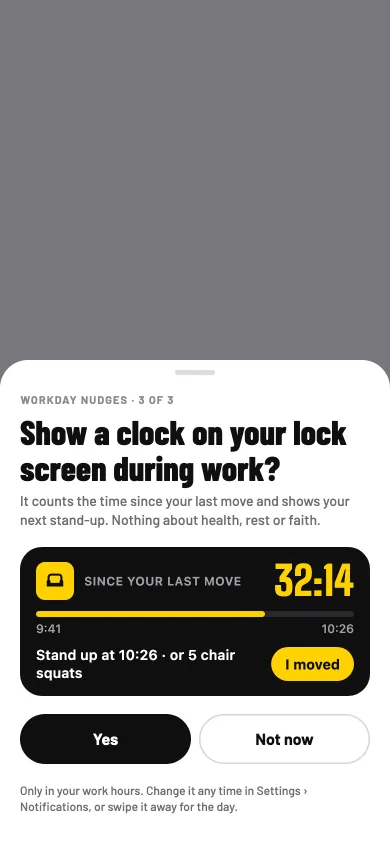
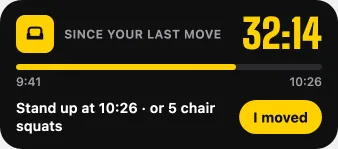
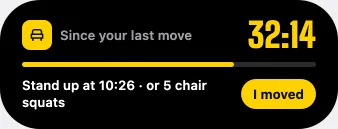
The chair clock asks once: "Show a clock on your lock screen during work?" Say yes, and your lock screen shows the time since your last move and your next stand-up, with one "I moved" button. On iPhone it's a Live Activity, in the Dynamic Island too; on Android, a quiet ongoing notification. It runs only in your work hours.
Asked once. Yes and Not now, the same size.On your lock screen. Time since your last move, and one button.In the Dynamic Island. The same clock, one press away.
What changes for you
Your day at a glance, without opening the app.
No countdowns, and nothing about health, rest or faith on the lock screen.
Turn off details to hide the next move and the word "chair".
Home screen, mediumStreakSteps
03
Getting stronger
Programs, and the ladder of rungs
Ladder freePrograms: Plus
A month ago, chair squats were hard work. Now they feel easy, and you're not sure what comes next.
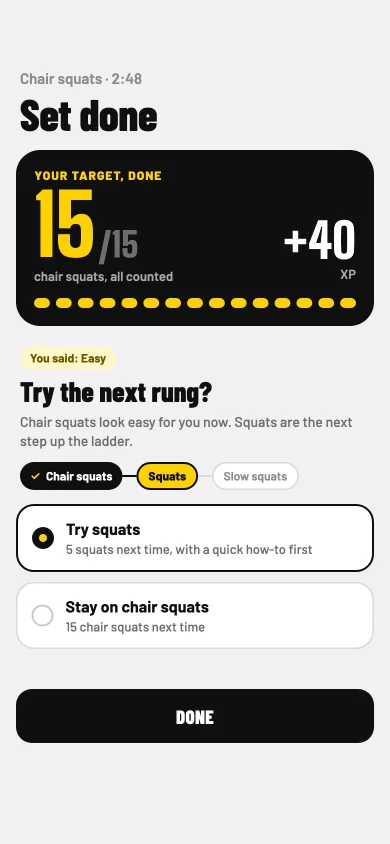
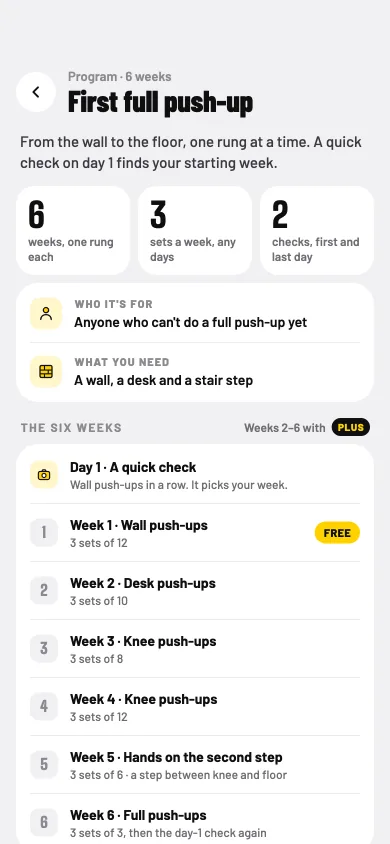
Every move is a ladder of rungs, from the gentlest version up. Chair squats lead to squats and slow squats. Wall push-ups lead to desk push-ups, knee push-ups and push-ups with your hands on a stair, then full push-ups. Desk planks lead to knee planks and planks, and hip hinges to good mornings.
When a rung feels easy, Sitbuster offers the next one, and an easier one when it feels hard. A harder rung is only ever offered. You choose.
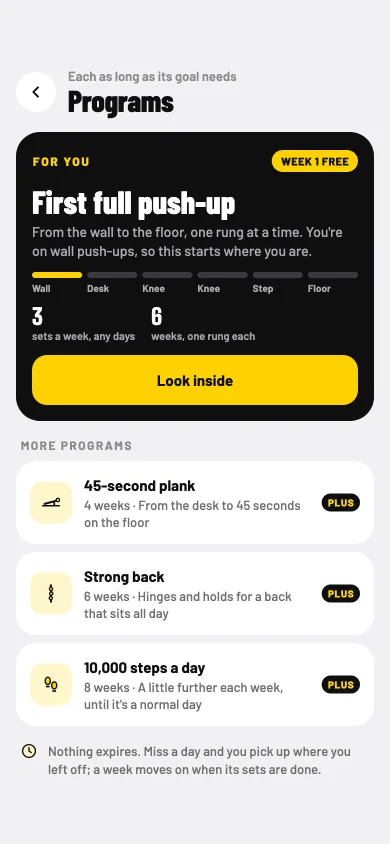
Programs aim at one goal at a time, from 4 to 8 weeks: First full push-up, the 45-second plank, Strong back, and 10,000 steps a day. A quick check on day one finds your starting week. Week 1 of First full push-up is free; the rest of Programs comes with Plus.
Try the next rung? Offered when a rung feels easy. Stay if you'd rather.
Programs. One goal at a time.
Look inside first. Every week of the program, before you start.
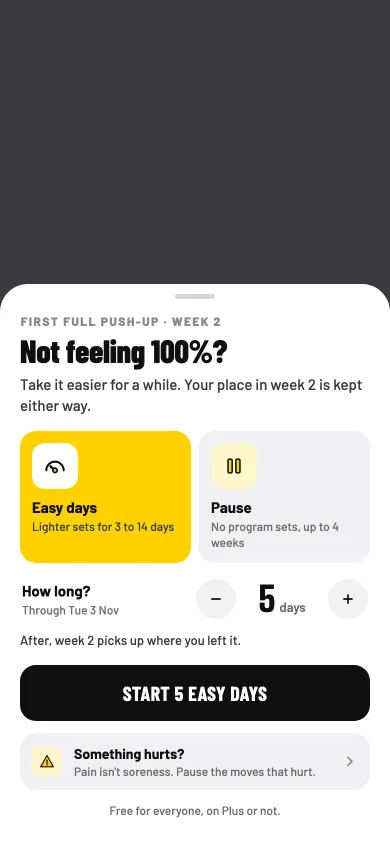
Not feeling 100%? Easy days or a pause, and your place is kept.
What changes for you
You always know the next step up, and you take it when you're ready.
Programs fit your own week: rest days stay rest days.
Nothing expires: miss a day and you pick up where you left off.
"Not feeling 100%" is free for everyone, on Plus or not.
A record at the end, and what to try next. Or do a program together with your crew.
It's hard to know when to do more. Too little and nothing changes. Too much, too soon, and you start to dread the next set.
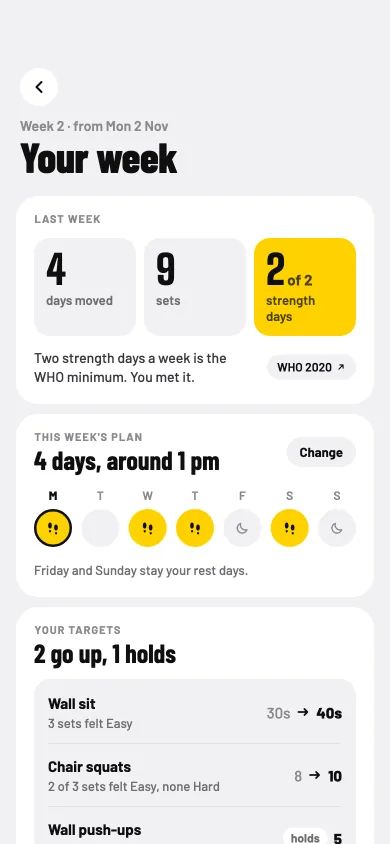
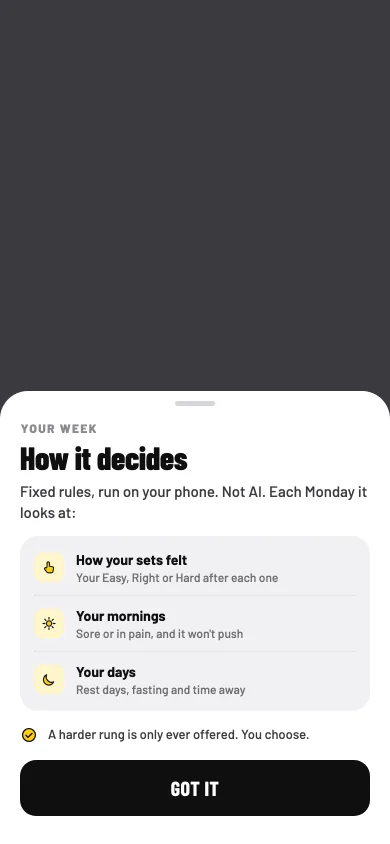
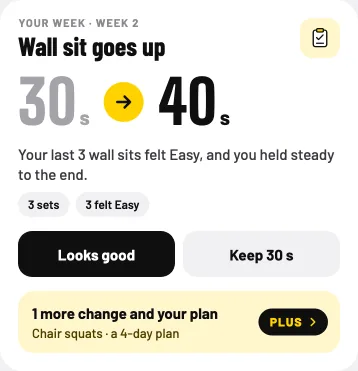
Every Monday the coach reads your week and sets this week's targets. Each change comes with its reason, from your own sets: how they felt, your mornings and your days. It's fixed rules, run on your phone. Not AI.
Free players get the top change every week. Plus shows every change with its reason, and plans the week around your days. Either way, you can say "Looks good" or keep last week's targets, and if you're sore or in pain, it won't push.
Your week, on Plus. Every change, each with its reason.
How it decides. What it looks at, in plain words.
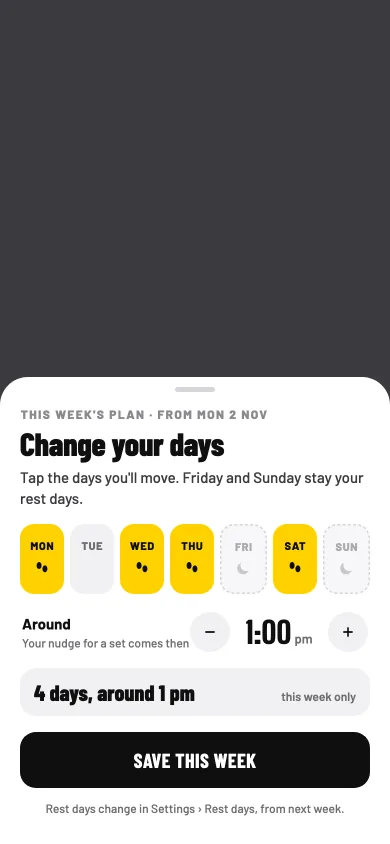
Your days, on Plus. Tap the days you'll move, and around when.
Free: the top change, on Today. With its reason, and "Looks good" or keep last week's.It won't push through pain. Rest days, fasting and time away are taken into account too.
The trail and its chapters
Chapters 1–1516–30: Plus
Moving every day is easier when the days add up to something you can see.
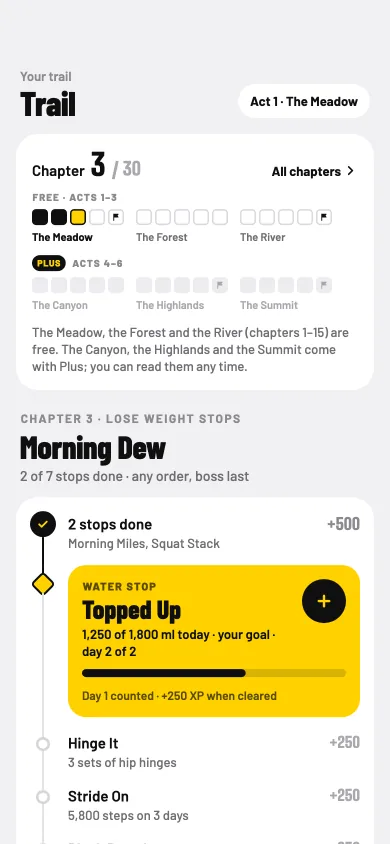
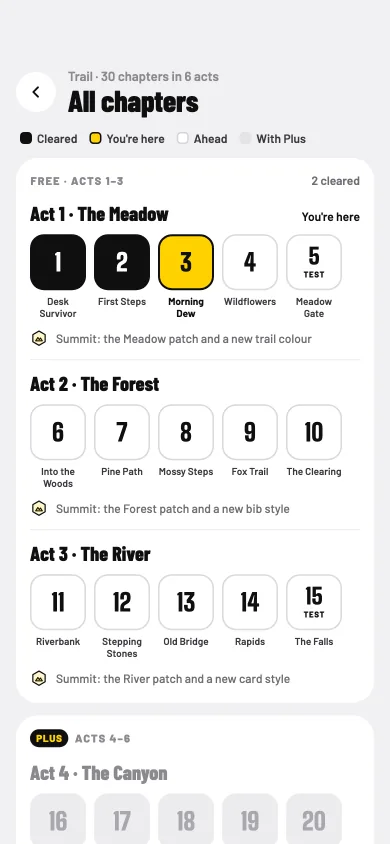
One trail for everyone: 30 chapters in six acts. The Meadow, the Forest and the River are free. The Canyon, the Highlands and the Summit come with Plus, and you can read every chapter from day one.
Each chapter has stops you clear in any order, then a boss. Stops ask for sets, steps or water, at your own goals. A few chapters are tests against your own first result. Bosses are everyday things turned creatures, like the Lazy Lounger.
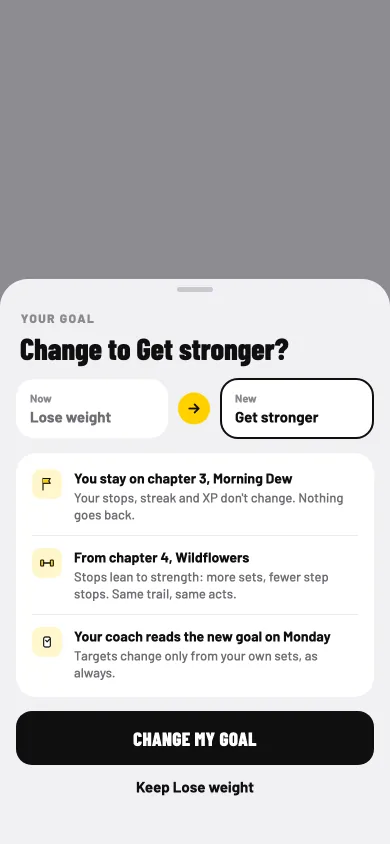
Your goal flavours the stops. Change it any time and keep your chapter: the new flavour starts at the next one.
Your chapter. Stops in any order, then the boss.
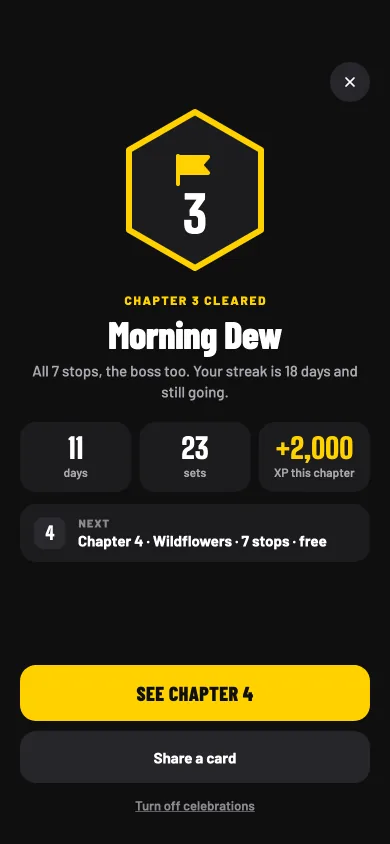
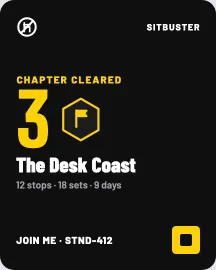
Chapter cleared. Your days, sets and XP, then on to the next.
All chapters. Every act, readable from day one.
Change your goal. You keep your chapter.
What changes for you
Every day you move takes you somewhere.
XP for every stop and boss, and a patch and a new look at each act's summit.
Up to two extra goals after chapter 1, each adding its own nudges and quests.
A chapter cleared is a moment worth sharing.
04
Keep going
Streaks, rest days and Away
Free
A cold, a trip to see family, a week of late nights. That's usually where a streak ends, and the habit with it.
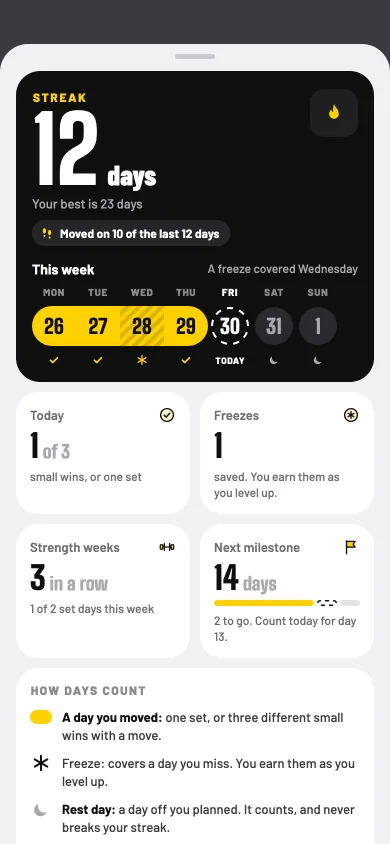
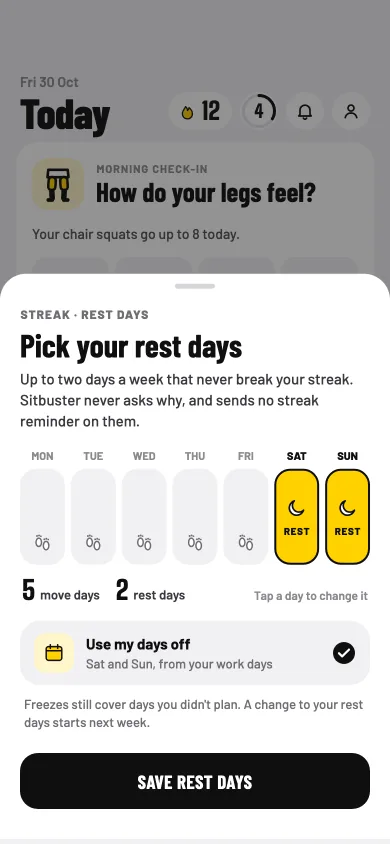
A day counts with a camera set, or a few different small wins with a move among them. Pick your rest days, and a planned rest day counts too. Freezes, earned as you level up, cover a day you miss. Freezes are never sold, not even in Plus.
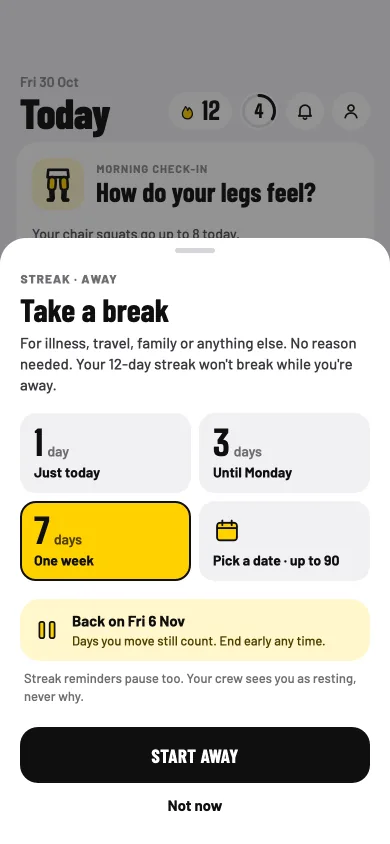
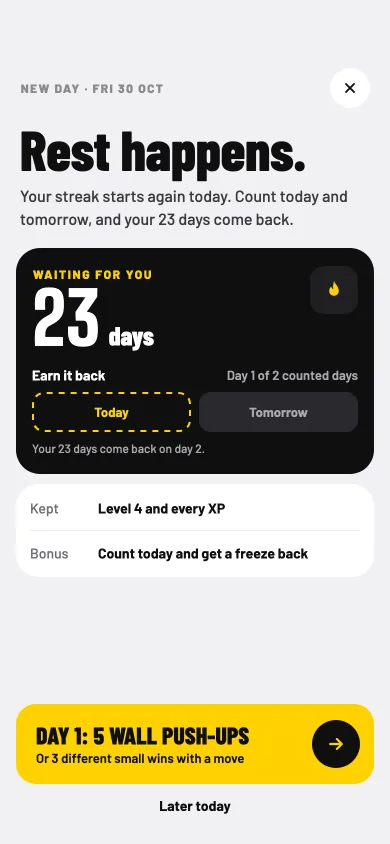
Life happens: you're sick, travelling or caring for someone. Away pauses your streak, so it neither grows nor breaks, and no reason is asked. Days you move still count, and you can end it early. And after a break, Sitbuster offers a way to earn your days back.
Your streak. What you've kept, never what you'd lose.
Rest days. A planned rest day counts.
Away. No reason needed.
Rest happens. A way to earn your days back.
What changes for you
A bad week doesn't have to undo a good month.
A weekly streak too: strength weeks.
Milestones with your race bib, from a week to a year.
A streak reminder if you want one: off by default, never on rest days or while you're Away, and never a "streak lost" alert.
No countdowns and no guilt. Rest and Away never show on share cards.
On a flat Monday morning, it helps to see how far you've come, and how last week really went.
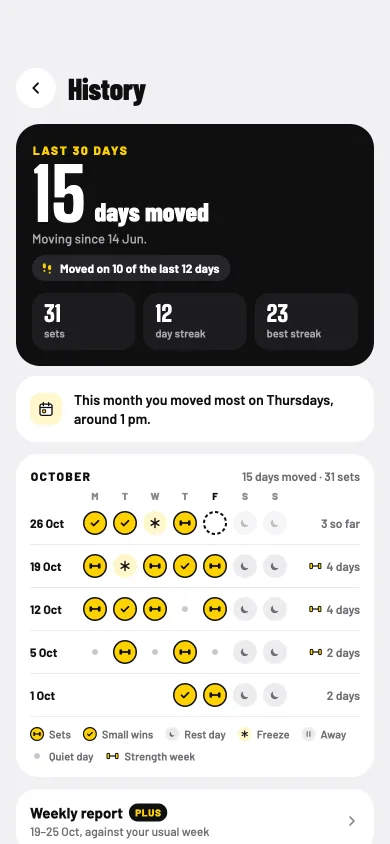
History shows every day you've moved, as months of day marks, with your best streak and since when you've been moving. Free shows your last 30 days. Every day is kept, and Plus shows them all.
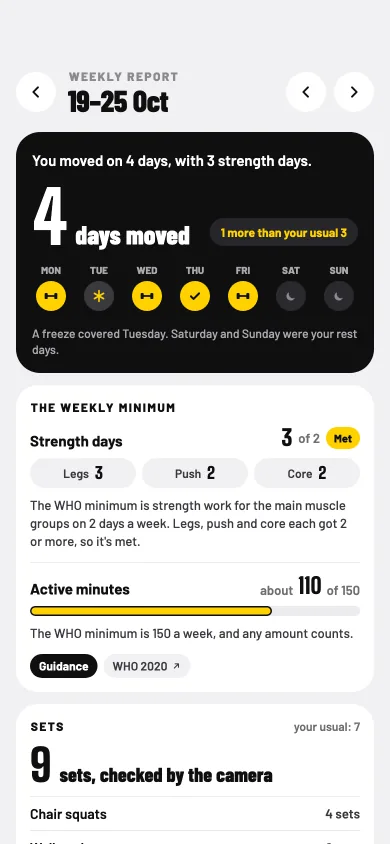
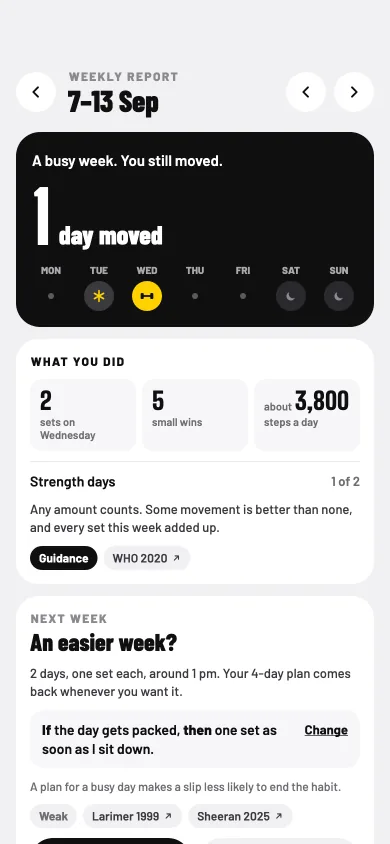
The weekly report, on Plus, looks back over your own week: days moved, strength days against the WHO minimum, active minutes, sets, steps and small wins, your best moment and a plan for next week. It compares you with your usual week, never with other people. A quiet week gets kind words, and an easier week if you want one.
History. Your last 30 days, free. Every day kept.
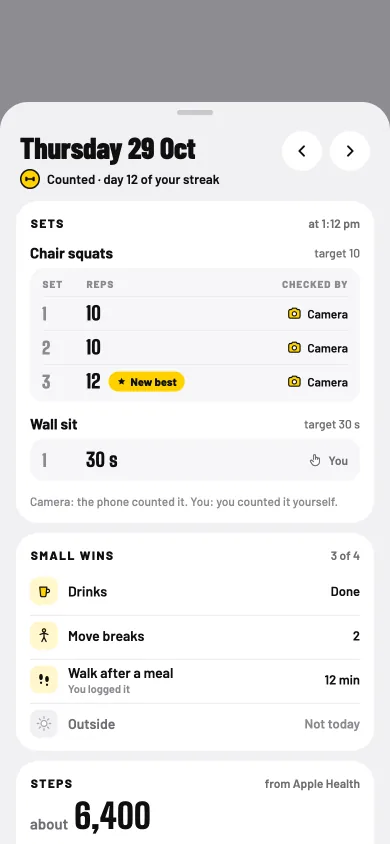
One day. Its sets, and which ones the camera checked.
The weekly report, on Plus. Your week against your usual week.
A quiet week. Kind words, and an easier week if you want one.
The WHO minimum is 150 active minutes a week, and any amount counts.
You've moved every week for a month. That deserves something, even a small something.
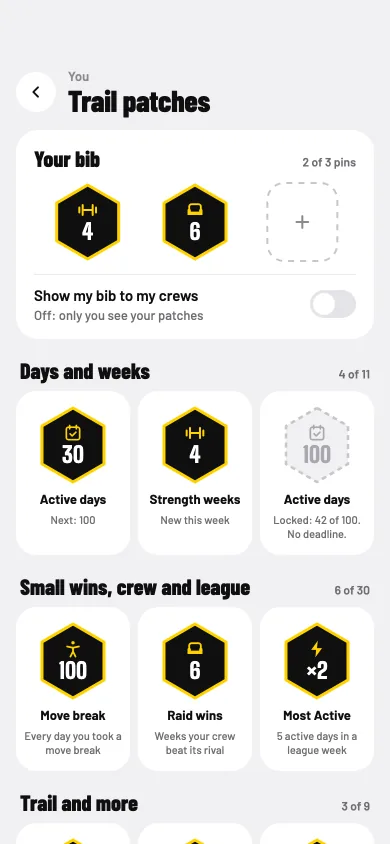
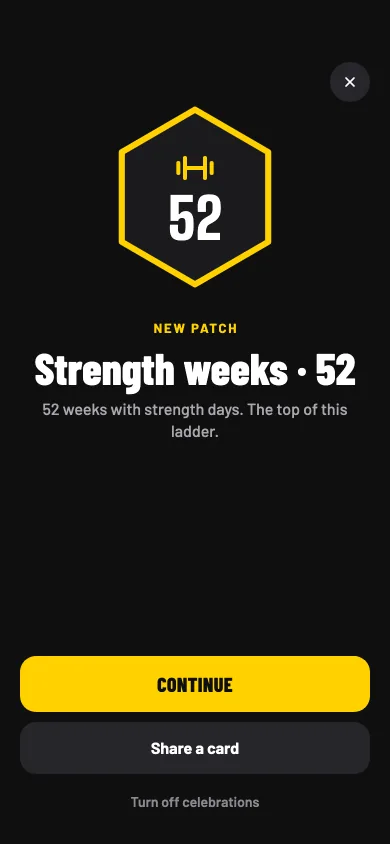
Trail patches mark what you keep doing: active days, strength weeks, a ladder for each small win, raid wins, act summits, coming back after a break, and a year with Sitbuster. They count days, not XP.
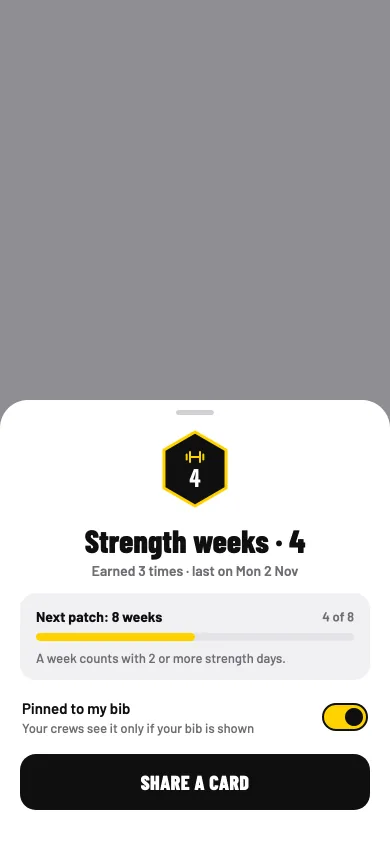
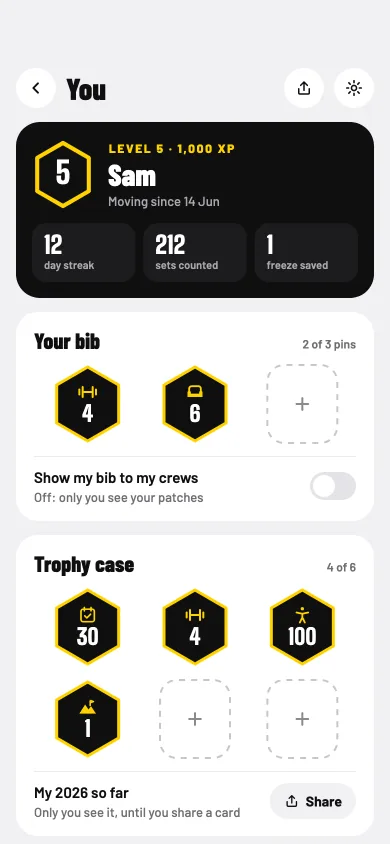
Pin up to three to your race bib, and show it to your crews if you like; it stays private until you turn it on. Your trophy case lives on You.
Your trail patches. Your bib, and every patch you've earned.
A new patch. Keep it, or share a card.
One patch. What it marks, and what's next.
You. Your level, your bib and your trophy case.
What changes for you
What you keep doing gets marked, not just the big days.
No rarity and nothing random. Locked patches show what's next, with no deadline.
Turn off celebrations and keep the record.
On Plus, an optional "PLUS since" mark beside your bib.
Share cards and invites
Free18+
You just cleared a chapter, and you'd like your friends to know, without sharing anything you'd rather keep to yourself.
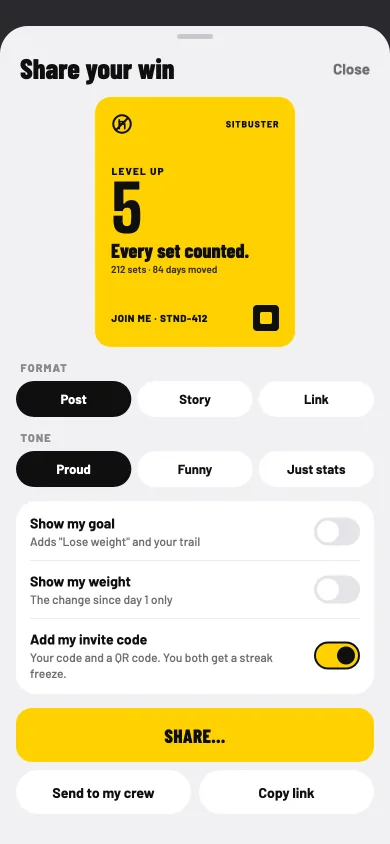
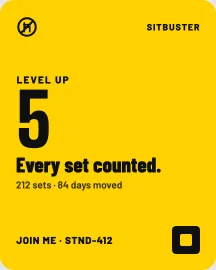
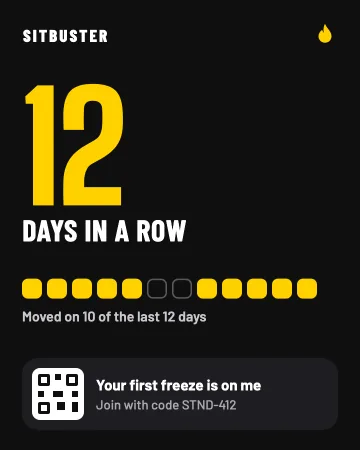
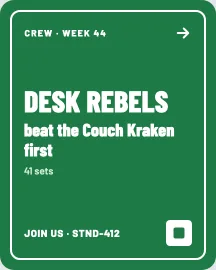
When something good happens, like a level up, a chapter cleared, a program done, a promotion, a crew win or a streak milestone, Sitbuster offers a card. Choose a post, a story or a link, and a tone: Proud, Funny or Just stats. Cards are drawn on your phone and go only where you send them.
Cards show effort only. "Show my goal" starts off, and nothing about health, pain, rest, fasting or where you are ever goes on a card. Send a win to your crew and it lands in their inbox.
Share your win. A post, a story or a link, in the tone you like.
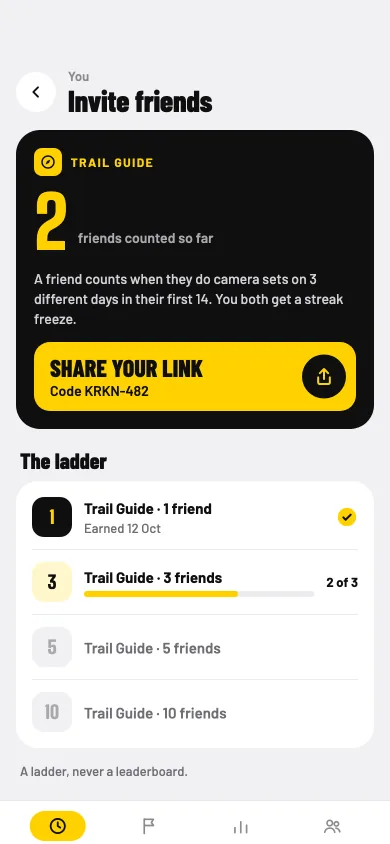
Invite friends. A ladder of Trail Guide patches, never a leaderboard.
Invites
Invite friends with your link. A friend counts once they've done camera sets on 3 different days in their first 14, and you both get a streak freeze.
Level upStreakCrew winChapter cleared
05
Together
League
Free18+
It's easier to keep going with someone to keep pace with, as long as it's fair and nobody sees more of you than you'd like.
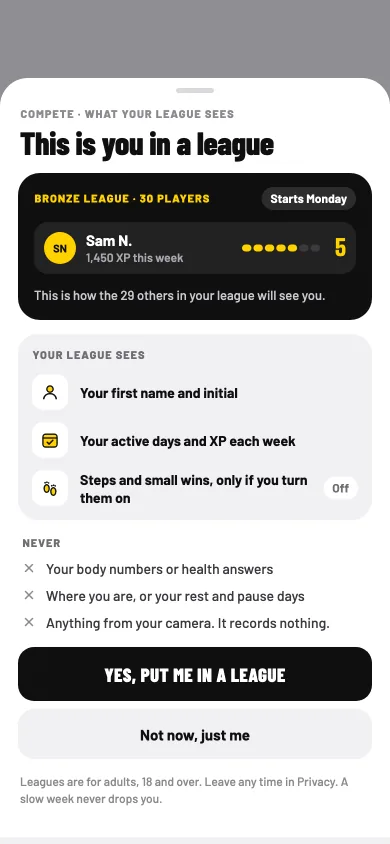
On day 3, Sitbuster asks if you'd like to play in a league, and shows exactly what your league would see. Say "Not now, just me" and you're never ranked. Change your mind any time in Settings.
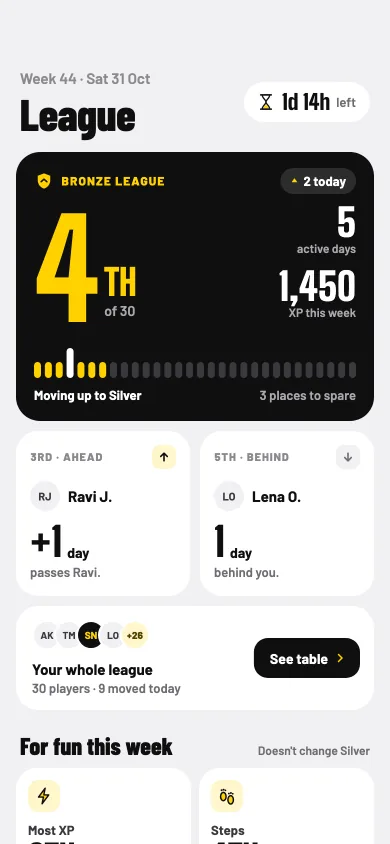
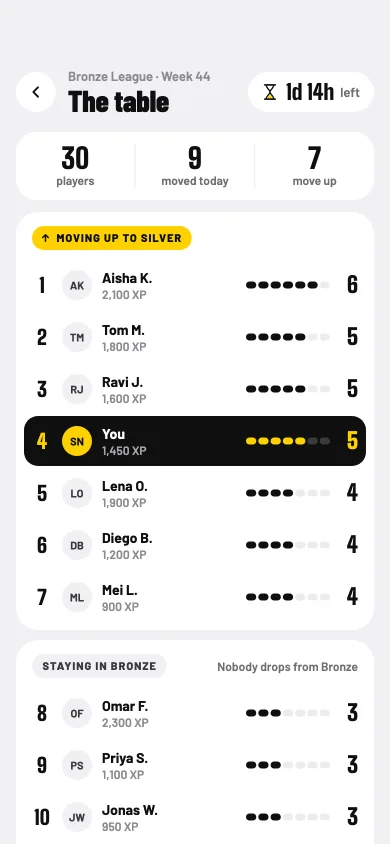
Leagues are weekly groups of people who move about as much as you, in tiers from Bronze up to Summit. Active days decide places, and a slow week never drops you. Most XP, Steps and every small win get their own boards, just for fun: they never change your league. Drinks count a healthy intake, at your own goal, so drinking more never wins.
If you join Country & world, you see how your week compares as a band, and a top 100 lists names only as each player chose to show them.
Day 3: your choice. What your league sees, and what it never sees.
Your league. People who move about as much as you.
The table. Active days decide places.
Boards for fun. They never change your league.
What changes for you
A fresh week to play for, against people at your pace.
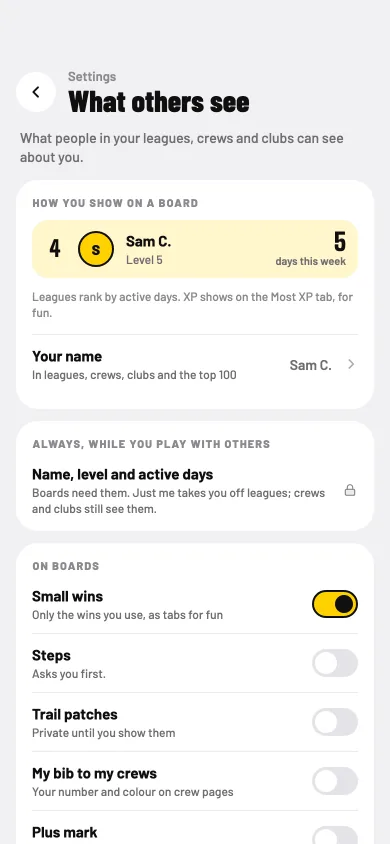
Your league sees your name as you choose it, your active days and your XP. Steps and small wins only if you turn them on.
Never your body numbers, health answers, where you are, or your rest and pause days. Nothing from your camera.
Take a break from rankings, or hide from any board. Report or block any player.
Leagues are for adults, 18 and over.
Crews, raids and the crew program
Free18+
Your team keeps saying everyone should move more. Nobody wants to be the one doing squats alone by the printer.
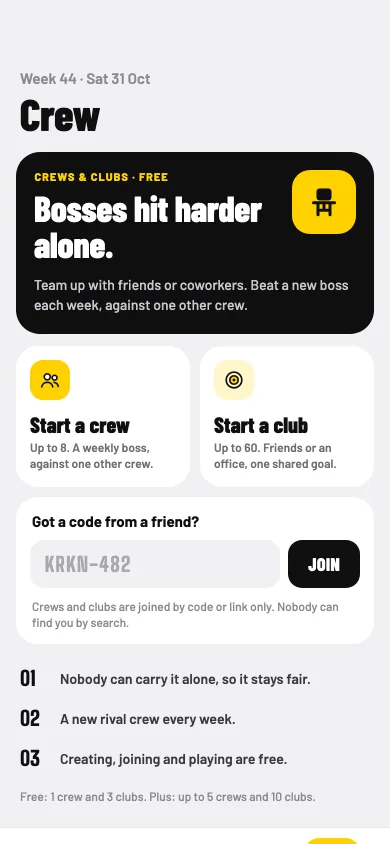
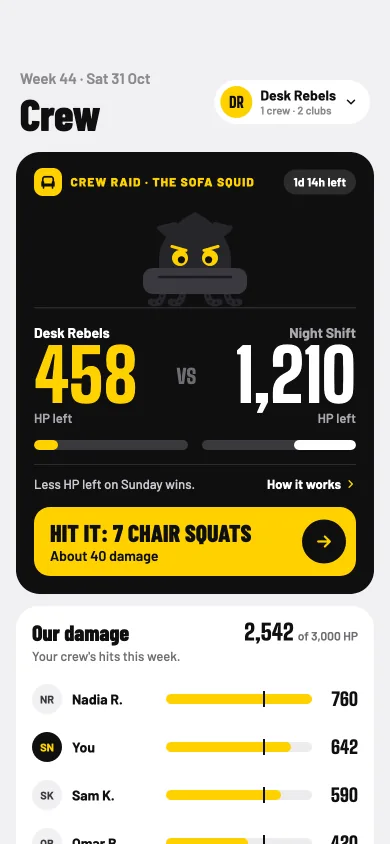
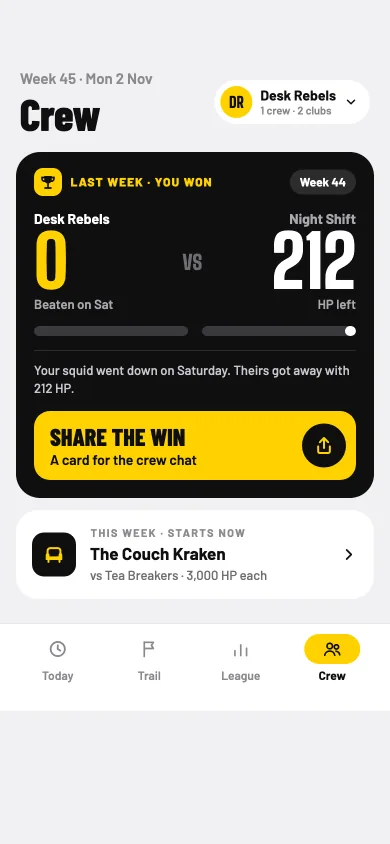
Bosses hit harder alone. Start a crew with friends or coworkers, and every week your crew fights a boss against one other crew. Your camera sets and steps hit it, and less HP left on Sunday wins. Nobody can carry it alone, so it stays fair.
Crews are joined by code or link only; nobody can find you by search. There's no chat, only high-fives. A crew league ranks the crew for fun, and a crew can do a program together.
Start a crew. Or join with a code from a friend.
The raid. Your sets and steps hit this week's boss.
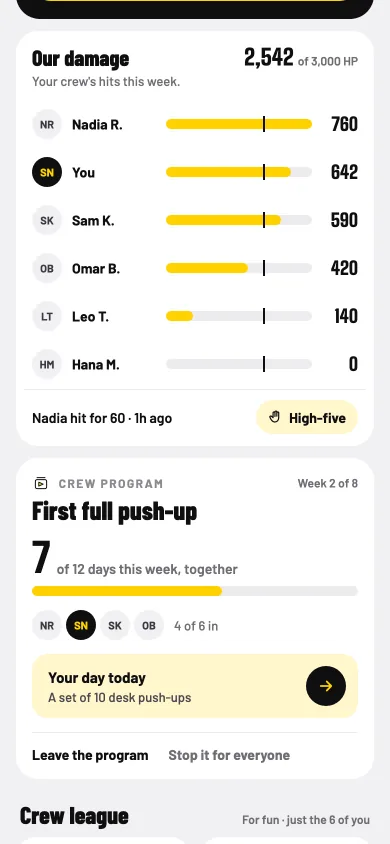
Together. Everyone's hits, and a program as a crew.
Monday: you won. Then a new boss, and a new rival.
What changes for you
Your sets count for the team, not only for you.
Your crew sees your name and your damage. Nothing else.
A new boss and a new rival crew every week, like the Couch Kraken and the Sofa Squid.
Free: 1 crew. Plus: up to 5. Crews are for adults, 18 and over.
Clubs
Free18+
The whole office could join in. But nobody wants their manager looking at their numbers.
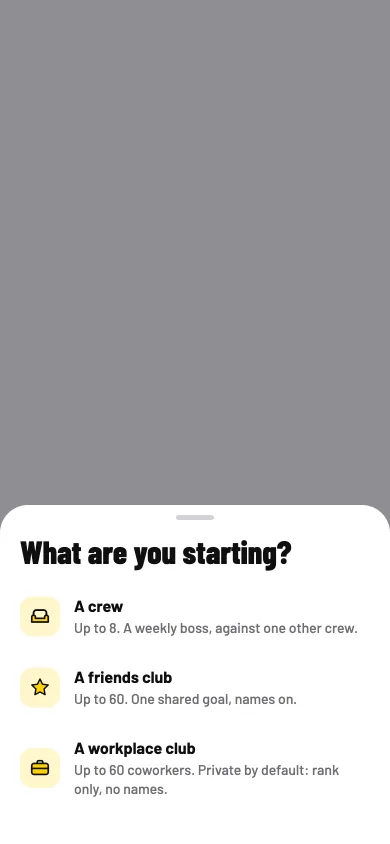
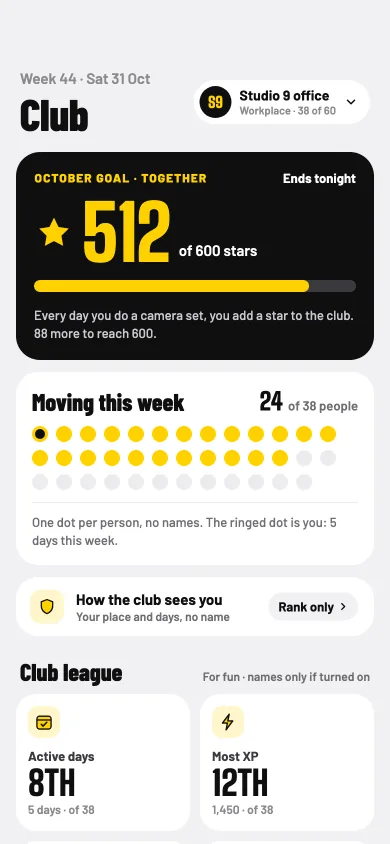
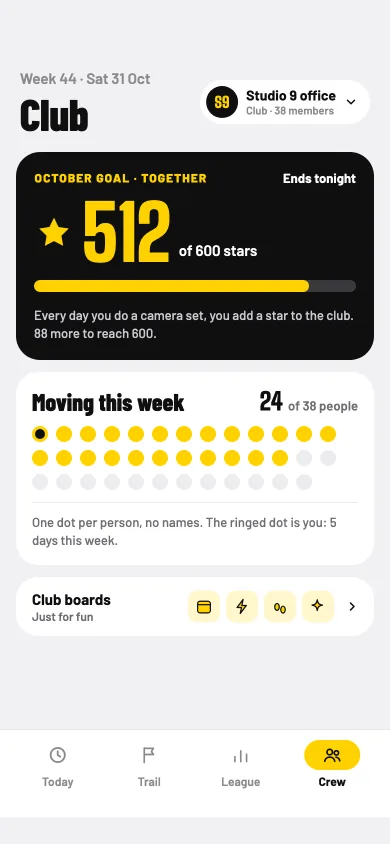
Clubs are for bigger circles: a friends club, or a workplace club for your office. Every club shares one goal for the month, counted in stars: every day you do a camera set, you add a star to the club.
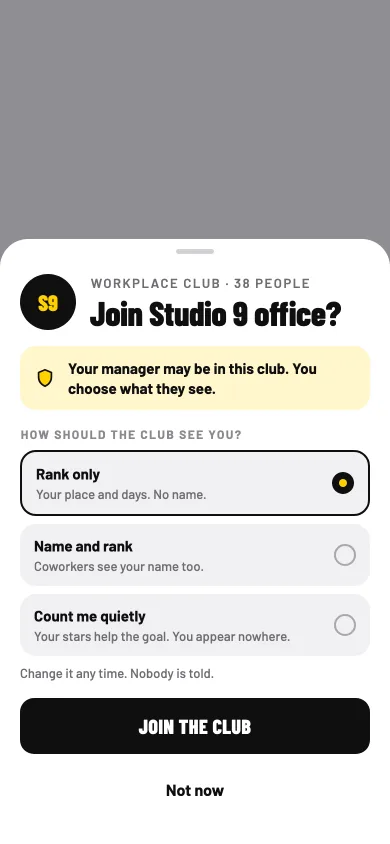
Workplace clubs are private by default. "Your manager may be in this club. You choose what they see." Everyone sees the same page, owners too. There are no reports, exports or "who's quiet" lists, and you join by code or link, never by work email.
Start something. A crew, a friends club or a workplace club.
A workplace club. One goal for the month, and who's moving as dots with no names.
You choose what they see. Rank only, name and rank, or count me quietly.
A friends club. Club boards for fun.
What changes for you
The office moves together, and nobody is singled out.
Choose how each club sees you, and change it any time. Nobody is told.
Club boards for fun, with names only for people who turned theirs on.
Free: up to 3 clubs. Plus: up to 10.
Friends, nudges and the inbox
Free18+
A friend is trying to move more too. A small "You've got this" at the right moment would help you both.
Add a friend with your friend link. Friends see your name and your week as a share of your own target, and nothing else. Pair up as buddies with one shared plan, like "After lunch, we both do our set."
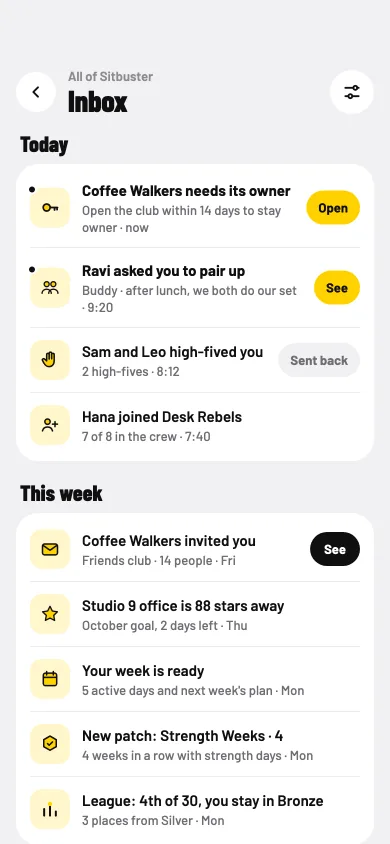
Send a friend or a crewmate a nudge: one of six fixed messages, "Stretch break?", "Walk with me?", "Water?", "You've got this", "Stand up!" or "High five". There's no free text, and anyone can turn nudges off. Everything lands in your inbox, behind the bell on Today. It's kept for 30 days, and only you see it.
Your inbox. High-fives, invites, your week and results.
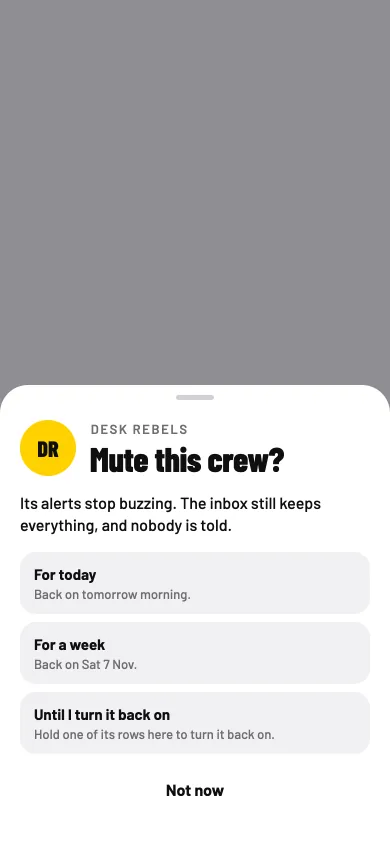
Mute a crew. The inbox still keeps everything.
What changes for you
A friend's nudge at the right moment, and yours for them.
"High-five back" in one tap.
"Moving now" for friends and crewmates, only if you turn it on.
A high-five arrives. One tap to send one back.
06
Made around you
About you, the pain map and Go easy on
Free
Your knee has been grumbling since the weekend, and you're not sure what you should and shouldn't do today.
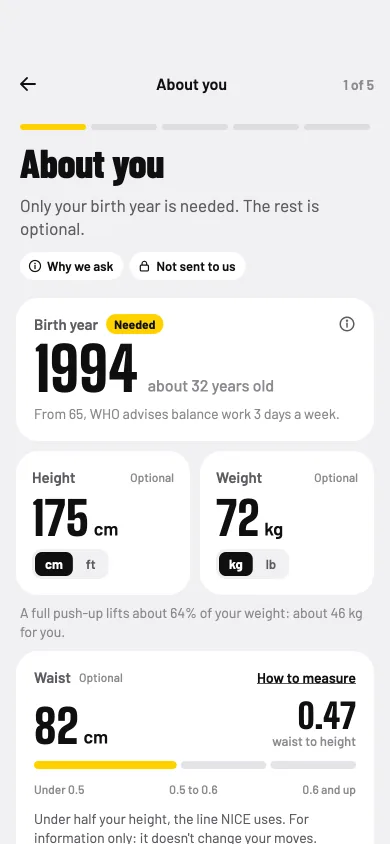
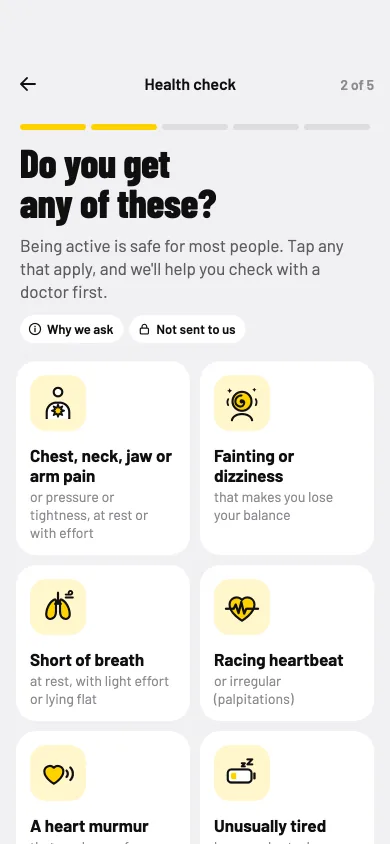
Before your first set comes a short health check. Only your birth year is needed; the rest is optional. It follows exercise guidelines: it asks about warning signs, known conditions and how active you are now. A yes means a check, not a no.
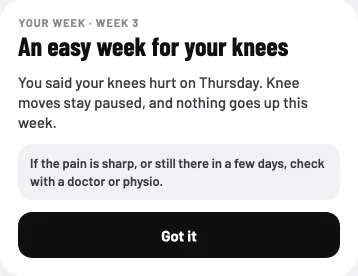
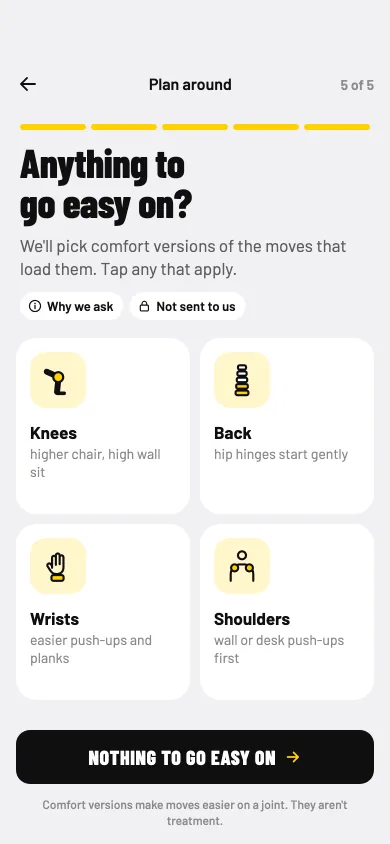
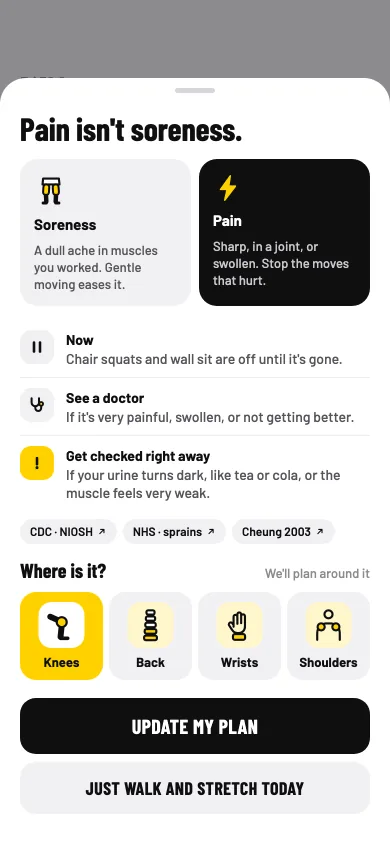
Tell Sitbuster what to go easy on, like knees, back, wrists or shoulders, and it picks comfort versions of the moves that load them. Sore one morning? Those muscles rest. Pain? Show where on the pain map, and those moves pause until you say it's gone.
About you. Only your birth year is needed.
Warning signs. Asked before your first set.
Go easy on. Comfort versions of the moves that load it.
The pain map. Those moves pause until you say it's gone.
What changes for you
A sore day changes the plan, instead of ending it.
Follow-ups only when an answer needs one, such as blood pressure, low blood sugar or pregnancy.
Asked again in a year, or sooner if your health changes.
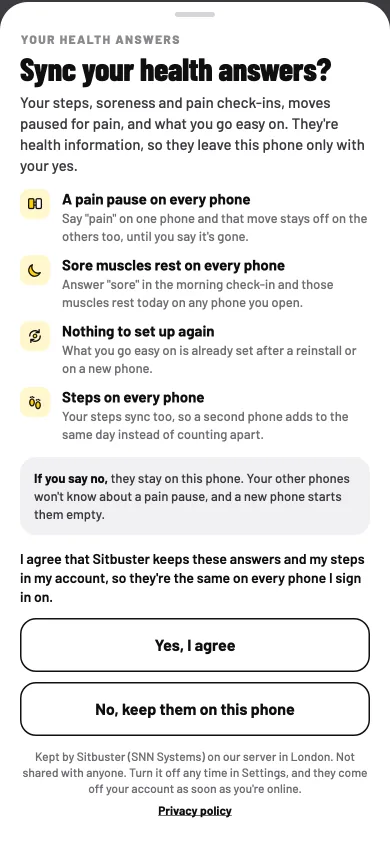
Your answers stay on your phone. They reach your account only if you turn on Sync health answers.
Exercise guidelines advise a doctor's check before you start, when you have a warning sign.
Pain isn't soreness. Sharp pain, in a joint, or swelling: stop the moves that hurt, and see a doctor if it's very painful, swollen, or not getting better.
It's Ramadan. A lunchtime walk and an afternoon water reminder don't fit a day of fasting.
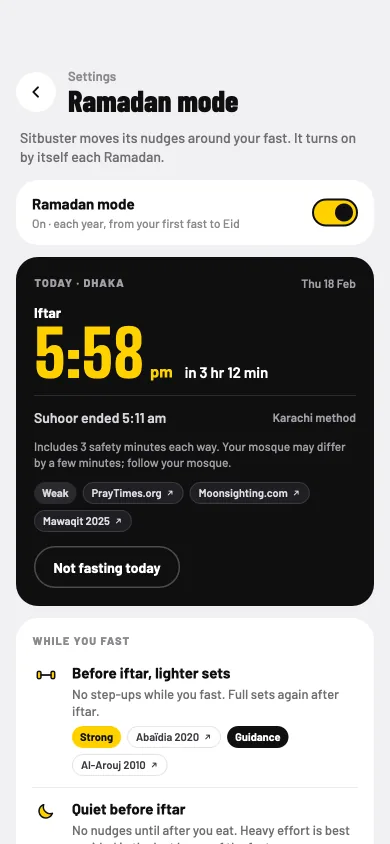
Ramadan mode moves Sitbuster's nudges around your fast. It turns on by itself each Ramadan, from your first fast to Eid, and you can switch it off. Before iftar, lighter sets and quiet before iftar; after iftar, a short walk; drinks between iftar and suhoor, with no water or lunch nudges while you fast; and nothing after isha and before work.
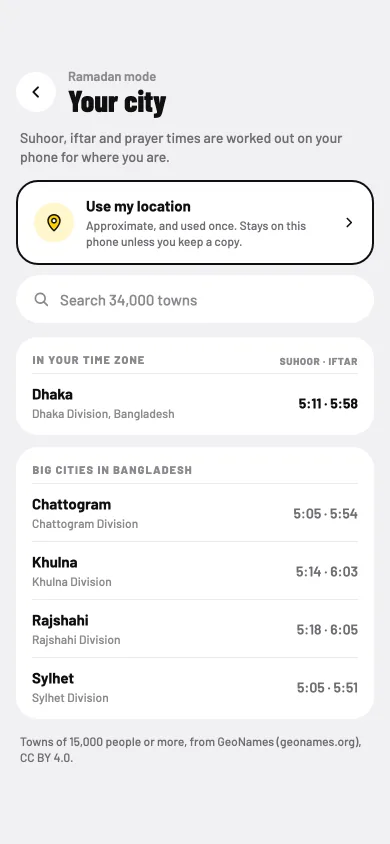
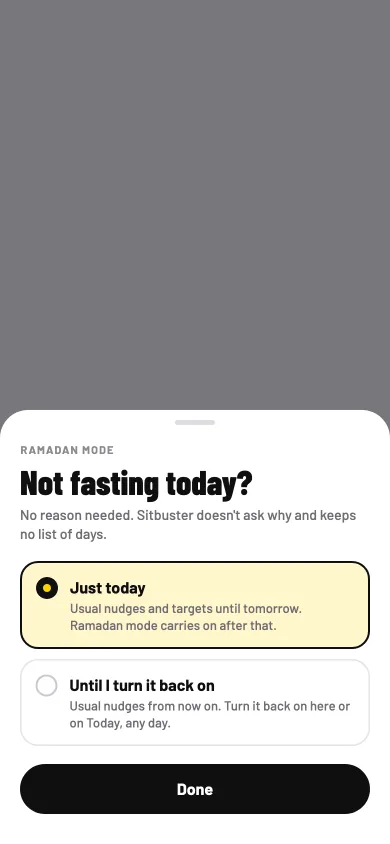
Suhoor and iftar times are worked out on your phone for your city: use your location, or search the list of towns kept on the phone. Pick how times are worked out, and match your mosque. Not fasting today? One tap, and no reason is asked. Different work hours this month? Set them once, and your usual hours come back after Eid.
Ramadan mode. Today's iftar, and what changes while you fast.
Your city. Times worked out on your phone.
Not fasting today? No reason needed.
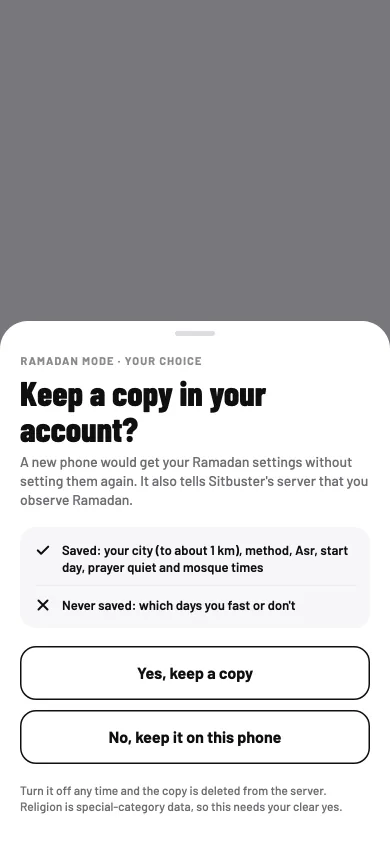
Keep a copy? Only if you say yes.
What changes for you
Nudges that fit your fast.
Your streak works as usual. Fasting is never counted, scored or shown to anyone.
Your Ramadan settings stay on your phone unless you keep a copy in your account. Fasting never shows on your lock screen, in notifications or in anything you share.
Quiet at prayer times is there all year, if you want it.
Heavy effort is best avoided in the last hours of the fast.
You move from a chair or a wheelchair, or the camera just isn't an option today.
Sitbuster is for every body that sits for work. Seated moves count as moves, and timers say "Walk or wheel". There's a seated move break: head, chest, wrists and a gentle twist, all from your chair, and in a wheelchair, put the brakes on first. Moves have comfort versions for knees, back, wrists and shoulders.
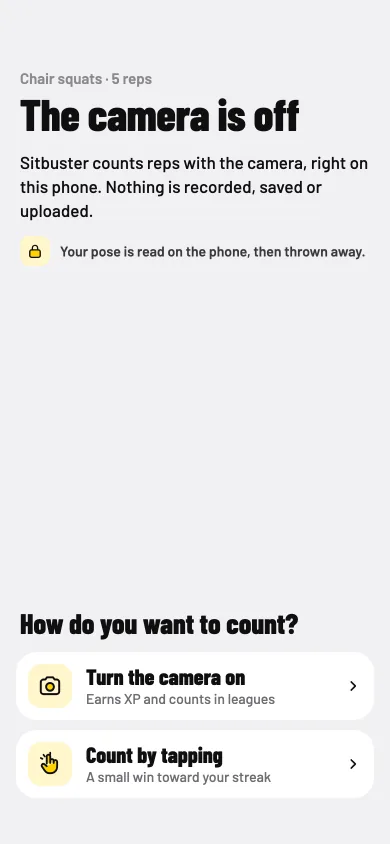
Camera off, or not for you today? Count by tapping, with a timer for holds. A walk after a meal works without steps: a timer counts it instead.
A seated move break. All from your chair.
Walk or wheel. A timer counts it.
Camera off? Count by tapping instead.
Quiet mode. No jumping, kind to offices and flats.
What changes for you
Every move you can do counts, wherever you do it from.
Big numbers you can read from across the room.
kg or lb, cm or ft, ml or fl oz, and a 12 or 24-hour clock.
Privacy
Free
A camera app at work? Before anything else, you'd want to know where the video goes.
Nowhere. The camera reads your pose on your phone, and each frame is dropped. Nothing is recorded, saved or uploaded.
You can play without an account. Sign in with Apple or Google to play together and keep your progress. Health answers and steps go to your account only after your yes to Sync health answers, and Ramadan settings only after their own yes. Each ask has two equal buttons. After a No to syncing health answers, we ask again at most once every two weeks.
Sync health answers? Two equal buttons.
What others see. Every choice on one page.
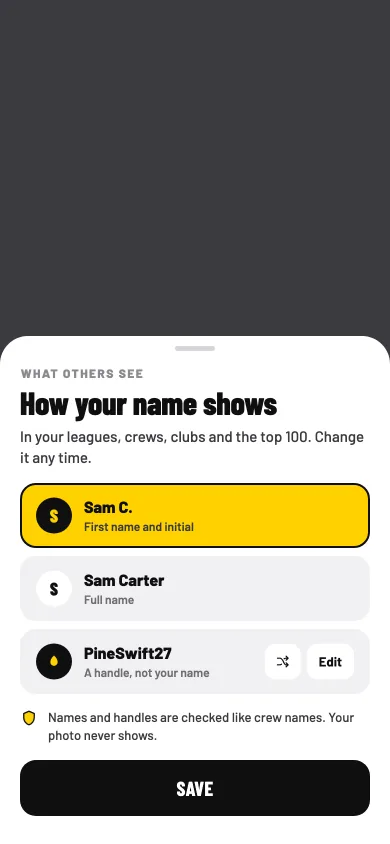
Your name. First name and initial, full name, or a handle.
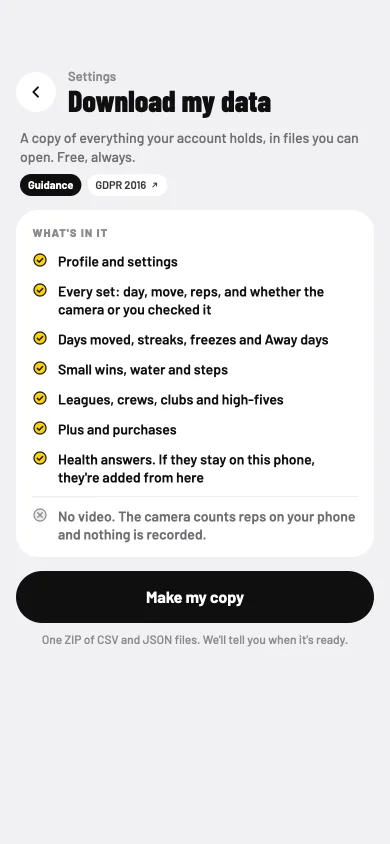
Download my data. Free, always.
What changes for you
You can move at your desk without being filmed.
Download my data: a copy of everything your account holds.
Delete your account in the app, or on the website.
No ads, no analytics, no tracking. Nothing is sold.
 Sitbuster