Sitbuster Join the beta

Sitbuster Plus

Plus, for when you want more.

Free is enough to build the habit and get better, and it stays free. Plus is for when you want the rest of the story: every day you've moved, a coach that shows all its reasons, programs with a goal at the end, the last three acts of the trail, and a few touches that make Sitbuster yours.

Here is each part, one at a time, with the screens you'll see.

Every day you've moved

Plus

You started in June. Some weeks were strong, some were a single walk after lunch. Now it's autumn, and you'd like to look back at all of it, not only the last month.

On Plus, History goes back to your very first day. You see every month as day marks, your best streak, how many days you've moved since you started, and the day of the week you move most.

Nothing is thrown away on free, either. Every day is kept, and free shows your last 30. The day you open Plus, the rest is already there.
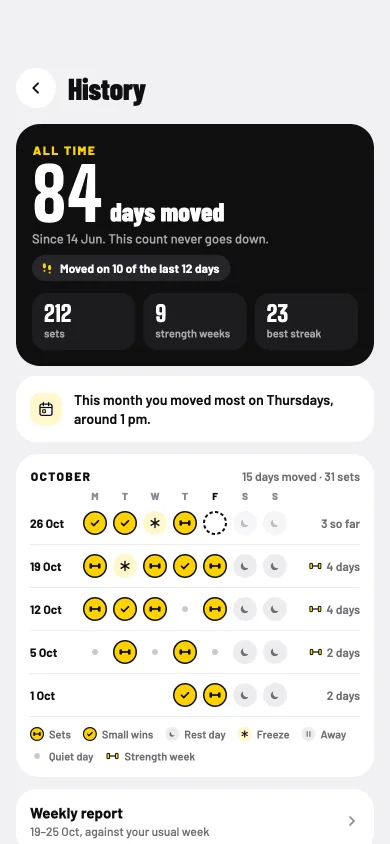
History on Plus: 84 days moved since 14 June, a count that never goes down, 212 sets, 9 strength weeks and a best streak of 23, then October's days and the months before.
All of it, back to day one. "84 days moved, since 14 Jun. This count never goes down." Then every month, as far back as you go.
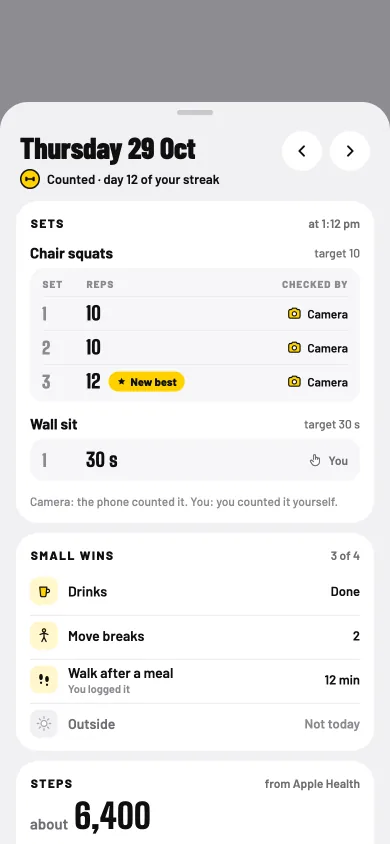
Thursday 29 October: counted, day 12 of the streak, with each set's reps and whether the camera checked it, and the small wins.
Any day, opened up. Tap a day to see its sets, which ones the camera checked, and your small wins.
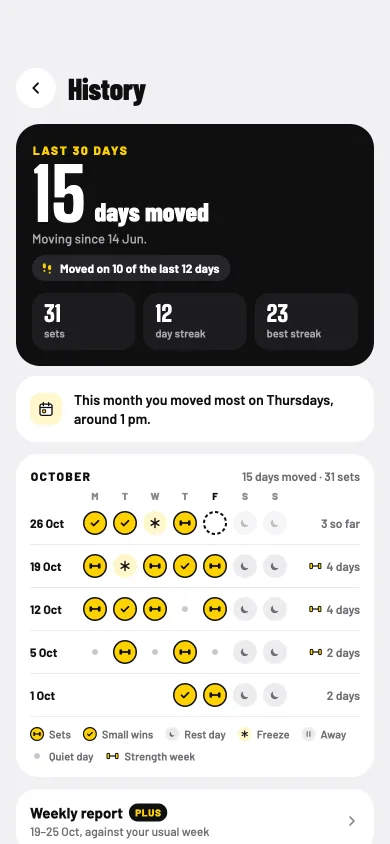
History on the free plan: 15 days moved in the last 30, the best streak, and October's days as marks.
On free: your last 30 days. Every day is still kept. Plus just shows you the rest.

The weekly report

Plus

Sunday evening. Was it a good week? It felt busy, but you did move, and you can't quite say how it compares with usual.

Every week, the report looks back at your own week: the days you moved, your strength days against the WHO weekly minimum, your active minutes, your sets, steps and small wins, and your best moment. It compares you with your usual week. Only you, never other people.

Then it looks ahead, with a plan for the coming week: which days, around when, and an if-then line for a busy day. A quiet week gets kind words instead of a red mark, and an easier week if you'd like one.

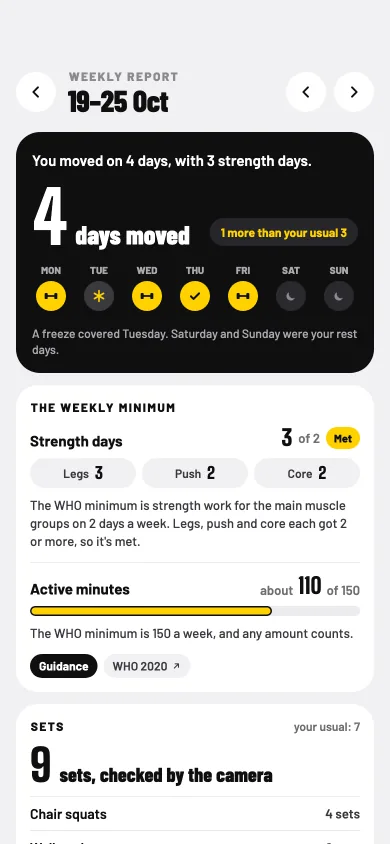
The weekly report for 19 to 25 October: 4 days moved with 3 strength days, the WHO weekly minimum met, and active minutes.
Your week, at a glance. "You moved on 4 days, with 3 strength days." One more than your usual 3.
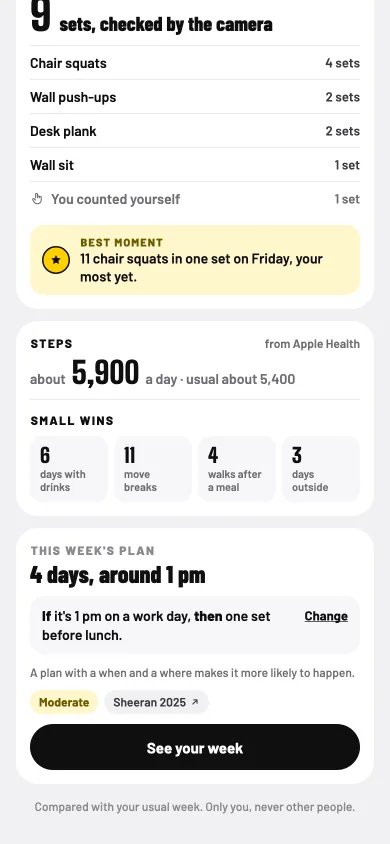
Lower in the weekly report: sets checked by the camera, the best moment, steps, small wins, and this week's plan: 4 days, around 1 pm, with an if-then line.
A plan for next week. Four days around 1 pm, and "If it's 1 pm on a work day, then one set before lunch."
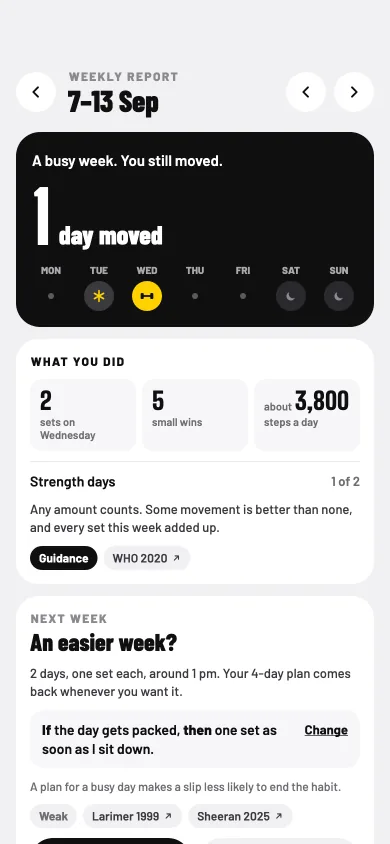
A quiet week: A busy week. You still moved. One day moved, what you did, and an easier week offered for next week.
A quiet week, said kindly. "A busy week. You still moved." And an easier week, if you want it.

The WHO minimum is 150 active minutes a week, and any amount counts.

A plan with a when and a where makes it more likely to happen.

Every coach change, with its reason

Top change freePlus: every change

Monday morning, and your wall sit target went up. Fair enough. But what else moved this week, and why?

Every Monday the coach reads your week and sets this week's targets. It reads your own sets: how they felt, your mornings and your days. It's fixed rules, run on your phone. Not AI.

On free, you get the top change each week, with its reason. On Plus, you see every change, each with its reason, so nothing in your week moves without you knowing why. If a target doesn't feel right, keep last week's. And if you're sore or in pain, it won't push.

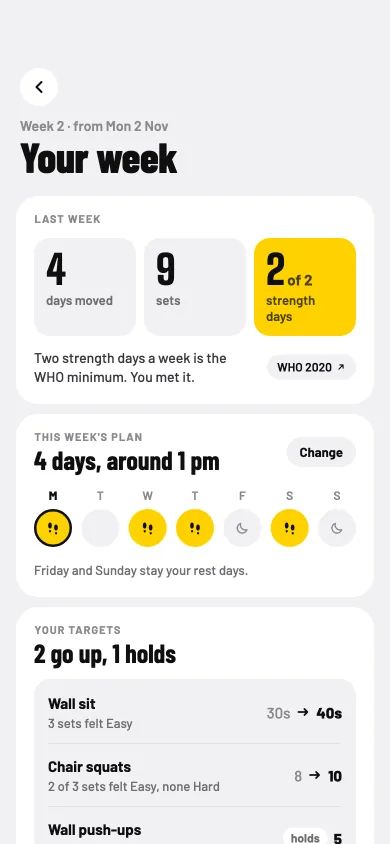
The coach's Your week page: last week's days moved, sets and strength days, this week's plan of 4 days, and new targets with reasons.
Every change, explained. Wall sit goes up, chair squats go up, wall push-ups hold, each with the reason beside it.
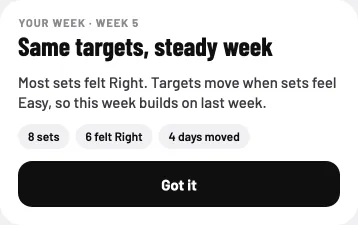
Same targets, steady week: most sets felt Right, so this week builds on last week, with 8 sets, 6 felt Right and 4 days moved.
A steady week is fine too. Not every week has to go up, and the coach says why.
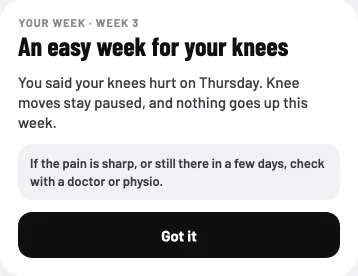
An easy week for your knees: you said your knees hurt on Thursday, so knee moves stay paused and nothing goes up this week, with when to check with a doctor or physio.
It listens when you hurt. Tell the morning check-in, and it won't push.

A week planned around your days

Plus

Your week doesn't run Monday to Friday. Friday is the long day, Saturday is free, and lunch is the only quiet hour you can count on.

On Plus, you tap the days you'll move this week and set around when. The coach plans the week around them, and your nudge for a set comes around the time you picked. Your rest days stay rest days.

This changes this week only. Your rest days for every week live in Settings.

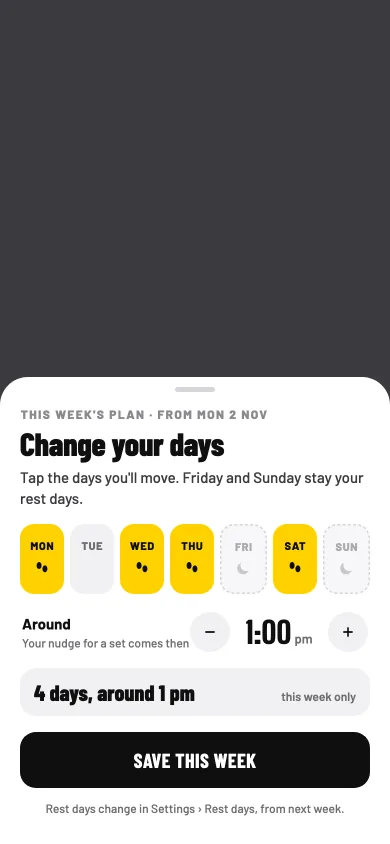
Change your days: Monday, Wednesday, Thursday and Saturday picked, Friday and Sunday as rest days, around 1:00 pm, and Save this week.
Your days, your time. Tap the days you'll move, and set around when. "Your nudge for a set comes then."
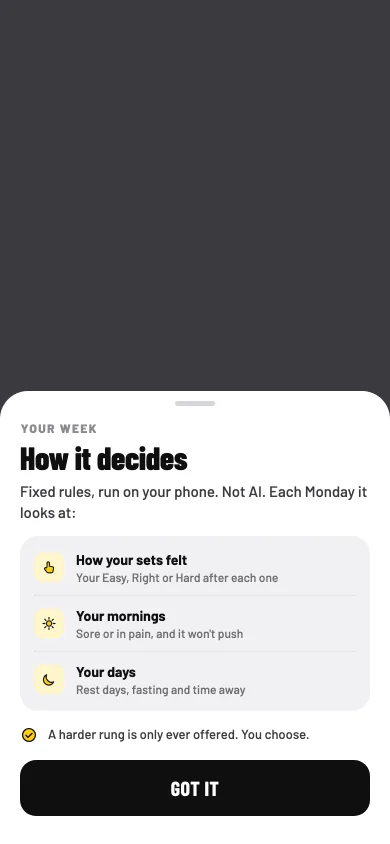
How it decides: fixed rules, run on your phone, not AI. Each Monday it looks at how your sets felt, your mornings and your days. A harder rung is only ever offered.
No black box. "How it decides" says what it looks at, in plain words. A harder rung is only ever offered.

Programs

Week 1 freePlus

One day you'd like to do a real push-up, on the floor. Right now it's push-ups against the wall, and you can't picture the weeks in between.

A program aims at one goal at a time, over 4 to 8 weeks: First full push-up, the 45-second plank, Strong back, or 10,000 steps a day. A quick check on day one finds your starting week, so you start where you are.

It fits your own week. Rest days stay rest days, and nothing expires: miss a day and you carry on from where you were. Not feeling 100%? Choose easy days or a pause, and your place is kept. That part is free for everyone.
At the end, the same check shows how far you came, and you choose what's next: the same program a step up, keep this level, or another goal. Week 1 of First full push-up is free, so you can try a program before you decide.

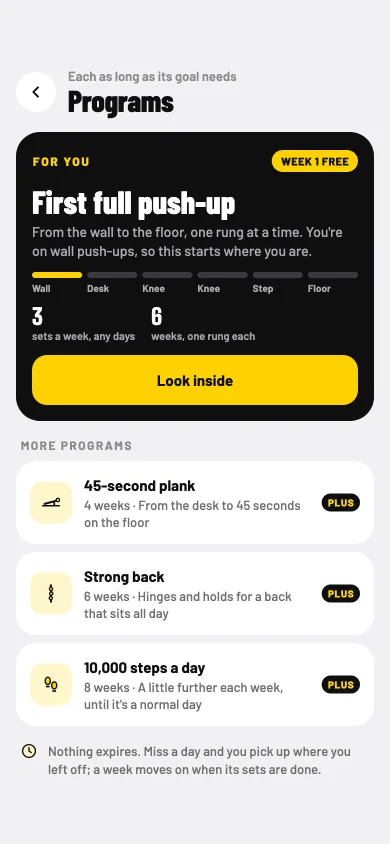
Programs: First full push-up for you, with week 1 free, then more programs marked Plus: 45-second plank, Strong back and 10,000 steps a day.
Pick one goal. First full push-up starts free. The others come with Plus.
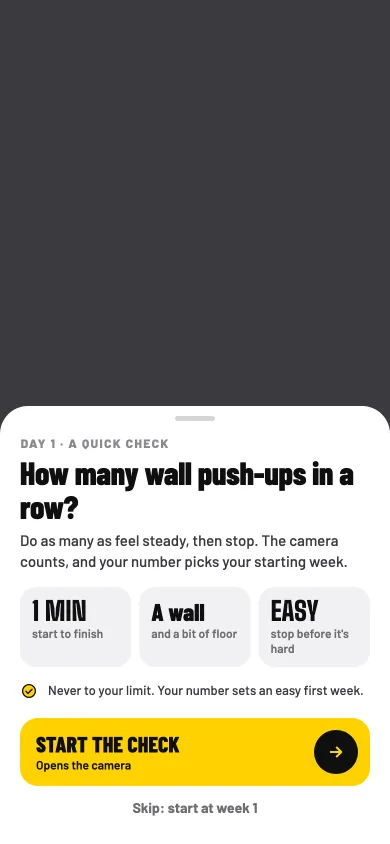
Day 1, a quick check: how many wall push-ups in a row? Do as many as feel steady, then stop, and the camera counts.
A quick check on day one. "Do as many as feel steady, then stop." The camera counts, and never to your limit.
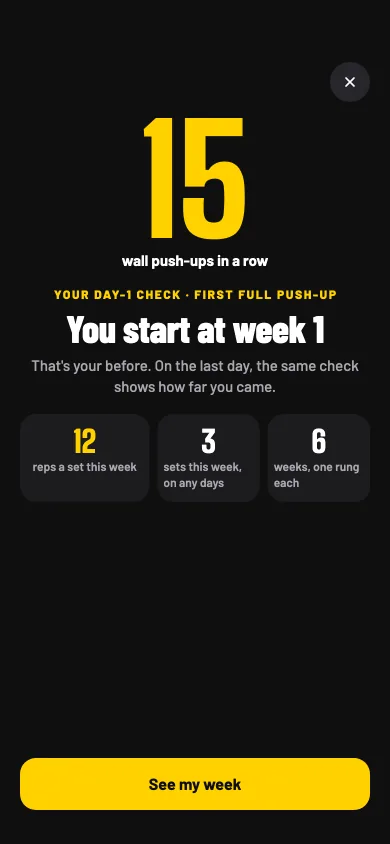
Your day-1 check: 15 wall push-ups in a row, so you start at week 1, with 12 reps a set this week, 3 sets on any days, and 6 weeks of one rung each.
You start where you are. Your number picks your first week, and the same check on the last day shows how far you came.

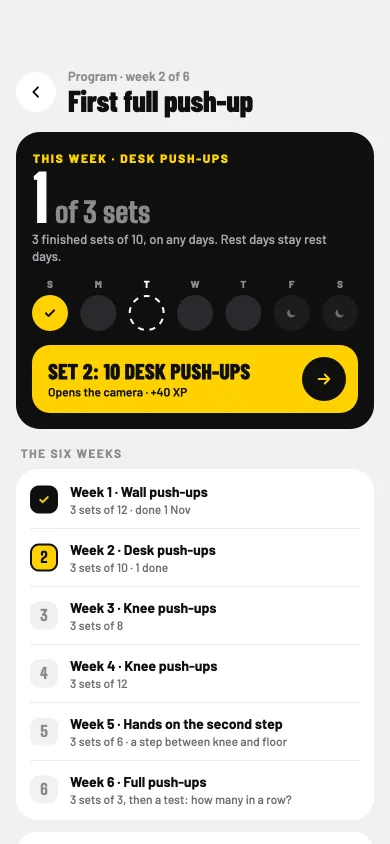
First full push-up, week 2 of 6: 1 of 3 sets this week on any days, the next set of 10 desk push-ups, and the six weeks from wall to full push-ups.
Week by week. This week's sets on any days, and all six weeks laid out, from the wall to the floor.
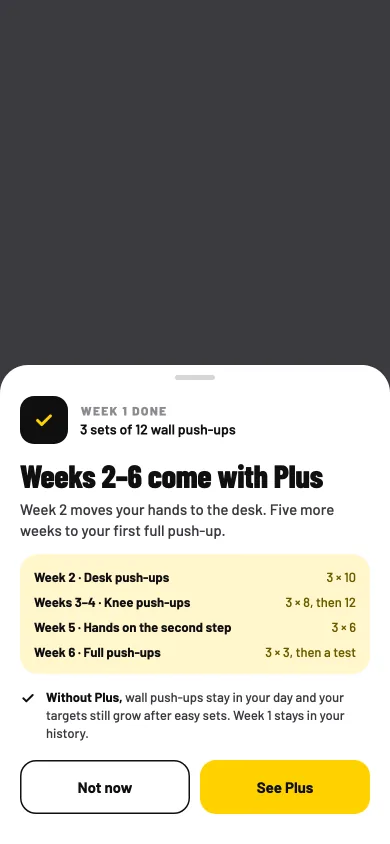
Week 1 done: 3 sets of 12 wall push-ups. Weeks 2 to 6 come with Plus, with the weeks listed, what stays without Plus, and Not now beside See Plus.
After week 1, your choice. What the next weeks hold, what stays if you don't take Plus, and "Not now" right beside "See Plus".
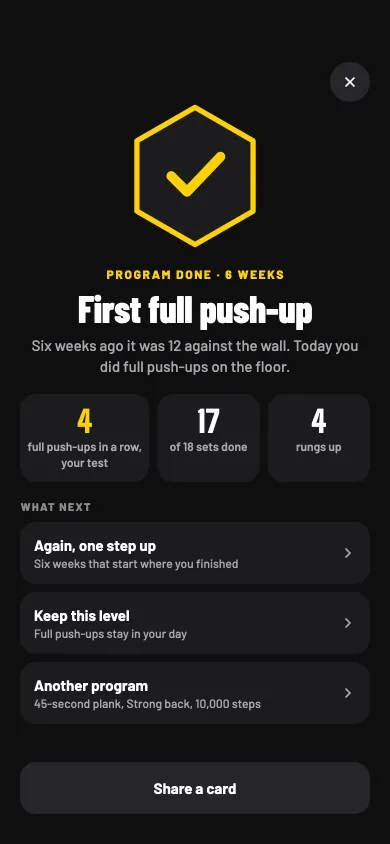
Program done, 6 weeks: First full push-up. Six weeks ago it was 12 against the wall; today you did full push-ups on the floor. What next: again one step up, keep this level, or another program.
Then, what next? "Six weeks ago it was 12 against the wall. Today you did full push-ups on the floor."

Programs and the ladder of rungs, in full

The Canyon, the Highlands, the Summit

Chapters 1–15 free16–30: Plus

Fifteen chapters in, you've walked the Meadow, the Forest and the River, and beaten a boss at the end of each one. You'd like to see what's past the river.

Plus opens chapters 16 to 30: three more acts, the Canyon, the Highlands and the Summit. Each chapter has its stops, cleared in any order on days you move, and a boss at the end, like the Forge.

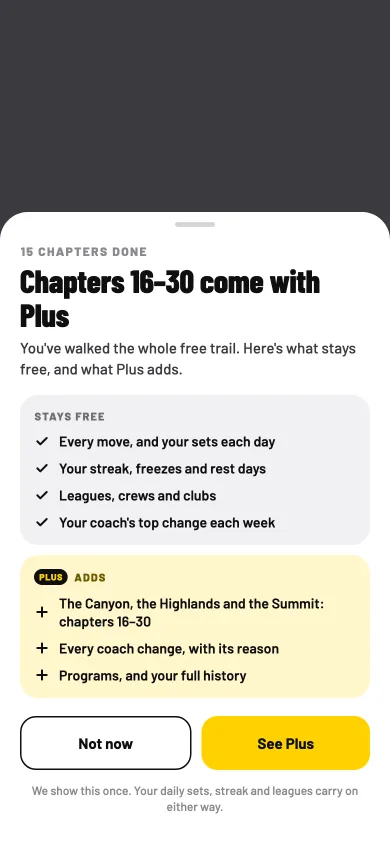
There are no surprises. You can read every chapter and its stops from day one, on free too: Plus chapters show their names with a Plus label, not a padlock. When you clear chapter 15, Sitbuster shows you once what stays free and what Plus adds, with "Not now" right beside "See Plus". Your sets, streak, small wins, leagues and crews carry on either way.

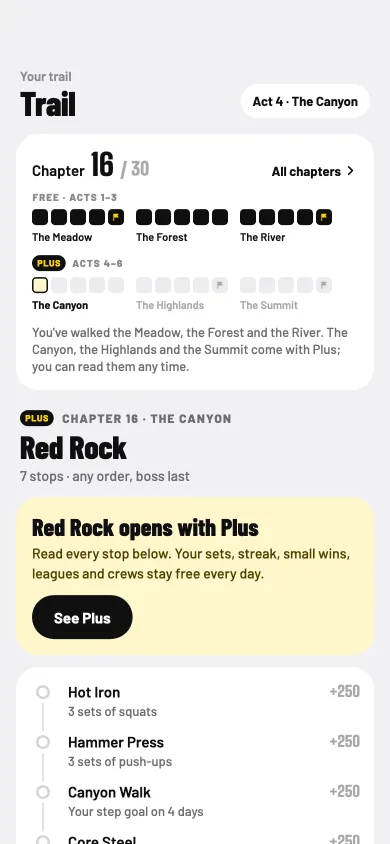
The Trail tab at chapter 16 of 30, Red Rock in the Canyon: Red Rock opens with Plus, read every stop below, with its seven stops and its boss, the Forge.
Chapter 16: Red Rock. "Read every stop below. Your sets, streak, small wins, leagues and crews stay free every day."
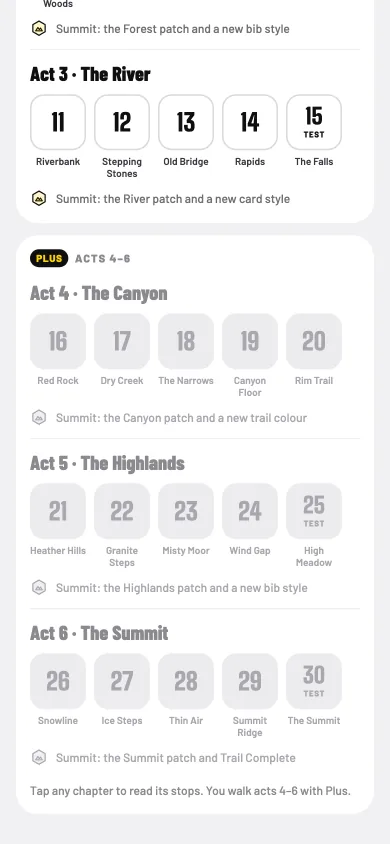
Lower on the all-chapters page: Act 3, the River, then acts 4 to 6 marked Plus: the Canyon, chapters 16 to 20, the Highlands, 21 to 25, and the Summit, 26 to 30, each with its summit reward.
Three more acts. Fifteen more chapters, each act ending at a summit with its own patch.
Chapters 16 to 30 come with Plus, shown once after chapter 15: what stays free and what Plus adds, with Not now and See Plus side by side.
Shown once, after chapter 15. What stays free, what Plus adds, and two buttons the same size.

Bib and trail designs, and your colour

Plus

Chrome yellow is Sitbuster's colour, and it suits a lot of people. But the bib on your cards is yours, and maybe you're more of a mint.

With Plus, you pick the colour of the thing to do now: the start button, the current stop on your trail, and your bib on the cards you share. Choose chrome yellow, signal orange, mint, sky, bubblegum or lime, and see it in the preview before you go.

The last three acts bring designs of their own: the Canyon's summit gives a new trail colour, and the Highlands' a new bib style. If Plus ends, your colour goes back to chrome yellow, and your pick is kept for when you come back.

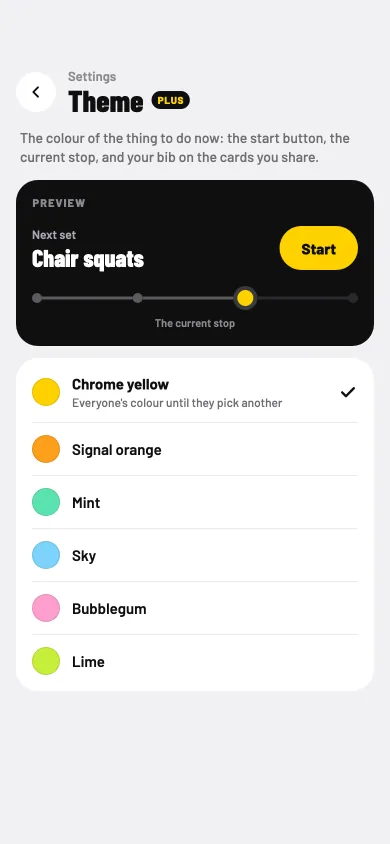
Theme, a Plus setting: a preview of the next set with a chrome yellow Start button and current stop, then chrome yellow, signal orange, mint, sky, bubblegum and lime.
Chrome yellow, everyone's colour. Until you pick another.
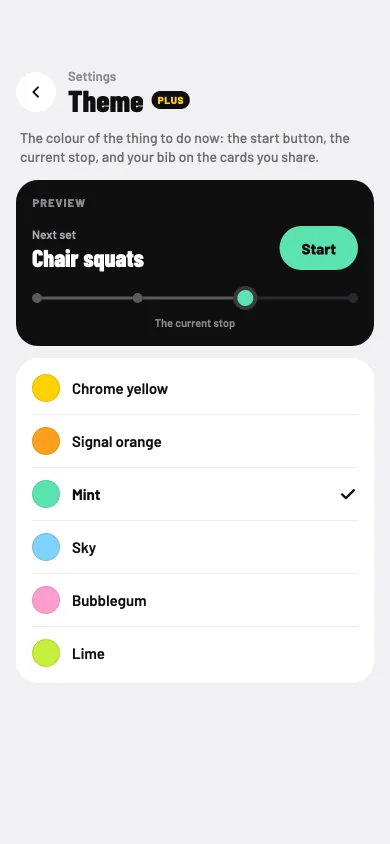
Theme with mint picked: the preview's Start button and current stop turn mint.
Or mint, or sky, or lime. The preview shows your start button and current stop in the colour you pick.
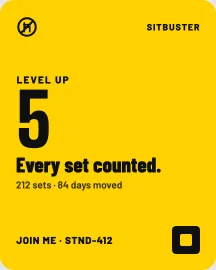
A yellow share card: Level up 5, Every set counted, 212 sets and 84 days moved, and Join me with an invite code.
Your bib, on the cards you share. Your colour goes with it.

Room for 5 crews and 10 clubs

1 crew, 3 clubs freePlus: 5 and 1018+

Your office has a club. Your old running friends started another. Your sister wants you in her crew, and so does your team.

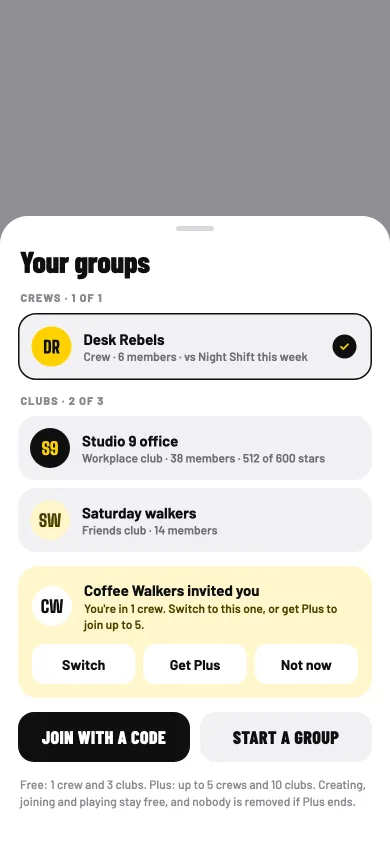
Free has room for 1 crew and 3 clubs. Plus makes room for up to 5 crews and 10 clubs.

Creating, joining and playing stay free. When an invite arrives and you're full, you choose: switch to the new one, get Plus, or not now. And if Plus ends, nobody is removed from your crews or clubs.

Your groups: one crew, Desk Rebels, and two of three clubs, then an invite from Coffee Walkers with Switch, Get Plus and Not now, and the free and Plus limits.
All your groups in one place. "Creating, joining and playing stay free, and nobody is removed if Plus ends."
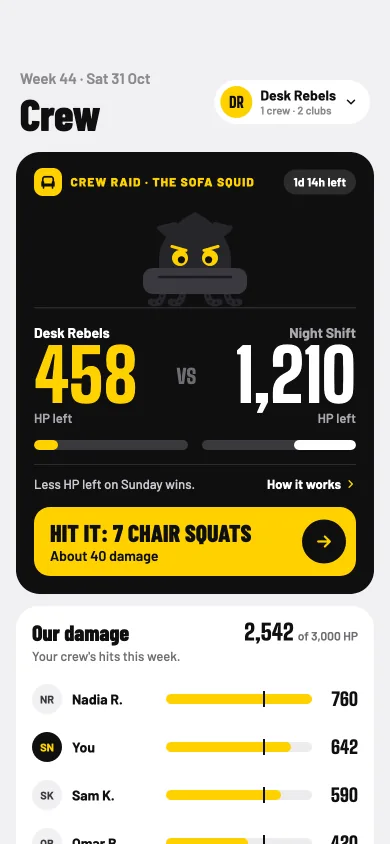
A crew raid on the Sofa Squid: Desk Rebels with 458 HP left against Night Shift's 1,210, and a button to hit it with 7 chair squats.
A crew for every circle. Each crew fights its own boss each week, against one rival crew.
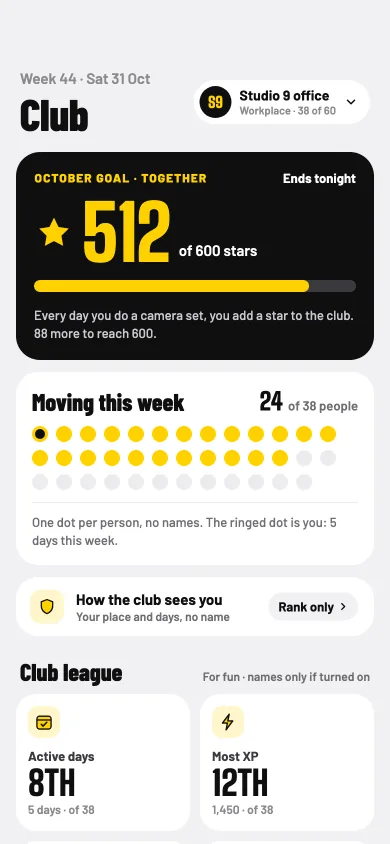
A workplace club page: the October goal at 512 of 600 stars, and who's moving this week as anonymous dots.
And clubs for bigger ones. One shared goal a month, for your office or your friends.

Your own nudges

Plus

You meant to call Mom on Sunday. Then it was Wednesday, then another week went by, and you hadn't called.

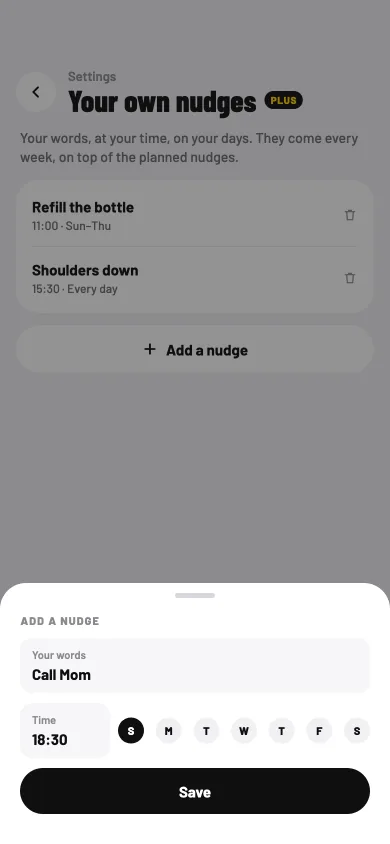
Never miss a call or a message to someone you love. With your own nudges, you write a reminder in your words, at your time, on your days. Write "Call Mom", pick Sunday at 18:30, and every Sunday evening your phone reminds you, on top of Sitbuster's planned nudges.

A small cue at the same time helps it become a habit. Use your own nudges for anyone you'd like to keep in touch with, or for anything that helps your day, like "Refill the bottle" or "Shoulders down". If Plus ends, they stop, but they stay saved.

Add a nudge: your words, Call Mom, at 18:30 on Sunday, with Save, over the Your own nudges page.
Your words, your time. "Call Mom", Sunday, 18:30. Pick any days, and any time.
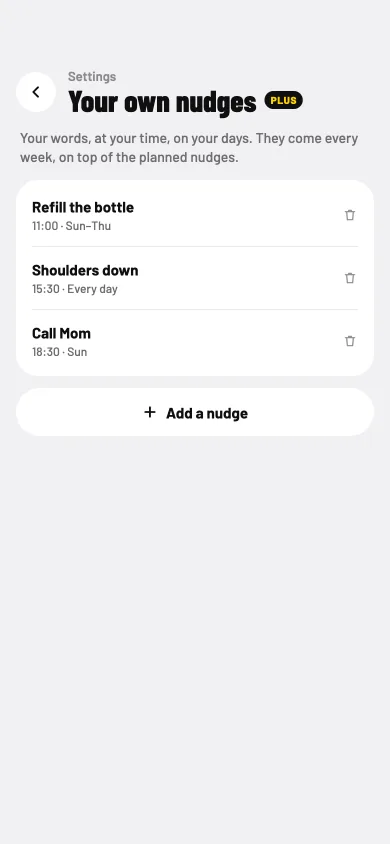
Your own nudges, a Plus setting: your words, at your time, on your days, every week. Refill the bottle at 11:00 Sunday to Thursday, Shoulders down at 15:30 every day, and Call Mom at 18:30 on Sunday.
Every week, until you remove it. Call Mom joins your other nudges, and comes every Sunday evening.

Tying a new habit to a set time, or to a daily routine, helped it form equally well. Repeating it was what mattered most.

Strong social ties are linked to a longer life. It's the line on the app's "Talk to someone" small win.

How cues build a habit

The PLUS since mark

Plus, off by default

You've backed Sitbuster for a while. You'd like that to show, quietly, and only if you want it to.

On Plus, you can show a small black "PLUS since 2026" mark beside your bib. It's off unless you turn it on, and it never sits in your trophy case with the patches you earned by moving. It's a mark, not a rank.

If Plus ends, the mark is paused, not taken away.

Two trail patches and a black PLUS since 2026 mark beside the bib, with the switch Show the Plus mark, off unless you turn it on.
Beside your bib, never in the case. "Show the Plus mark. Off unless you turn it on."
Three marks: PLUS since 2026, PLUS 2 years, and a grey PLUS 2 years, paused.
Paused, not taken away. If Plus ends, the mark turns grey and waits.

How we offer Plus

Plus should feel like a choice you made, not one you were pushed into.

No pressure, no tricks

You've seen apps sell a streak back to you, hide the close button, or ask for money the moment you've finished something hard.

Sitbuster doesn't. Streak freezes are earned, never sold, not even in Plus. Plus is never offered before your first set, in the middle of a set, at a streak moment, or by a notification. "Not now" is always as easy to see as "See Plus".

Downloading your data and deleting your account are free, for everyone. And there are no ads, no analytics and no tracking, whether you pay or not.

The price shows before you pay

Before you tap anything, you'd like to know what it costs, when you'd pay, and how to stop.

Plus is monthly or yearly. The yearly plan starts with 7 days free, and Sitbuster reminds you the day before the trial ends. Monthly has no trial. Prices show in your local currency, in the app and on the App Store or Google Play, before you pay.

Plus renews until you cancel, and you can cancel any time in your App Store or Google Play settings. Deleting the app or your account doesn't cancel it, so cancel there first.

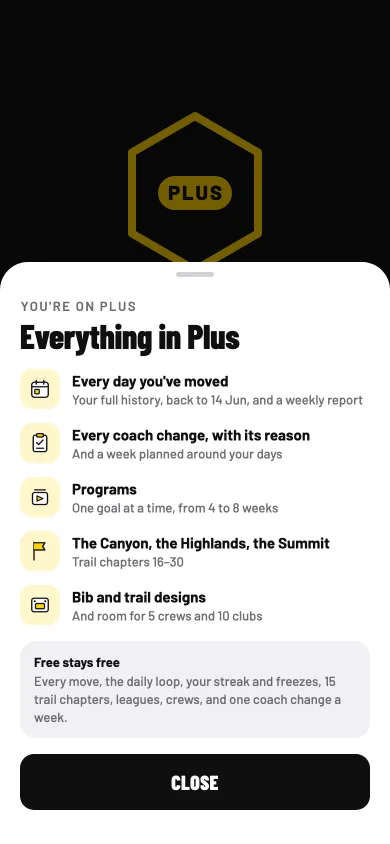
Everything in Plus: every day you've moved, every coach change with its reason, programs, the Canyon, the Highlands and the Summit, and bib and trail designs, then Free stays free.
Everything in Plus, in one list. And under it, in the same sheet: "Free stays free".
Welcome to Sitbuster Plus: your free week runs to Friday 6 November, a reminder on Thursday 5 November, nothing charged before then, and what's now open.
A reminder before you're charged. "Your free week runs to Fri 6 Nov. We'll remind you on Thu 5 Nov, and nothing is charged before then."

If Plus ends, you keep your progress

Money's tight this year, or you just want a break from paying. What happens to everything you built?

You keep it. Every day stays kept in History. A program pauses with your place kept. Nobody is removed from your crews or clubs. Your own nudges stop, but stay saved. Your colour goes back to chrome yellow with your pick remembered, and the PLUS since mark is paused, not taken away.

And everything free carries on as before: every move, the daily loop, your streak and freezes, 15 trail chapters, leagues, crews, and the coach's top change each week.

Try it first

Start free. Add Plus when you want more.

Sitbuster is in beta on iPhone and Android, free, with no ads.